


Use Case · NeoCloud and Infrastructure
Usage-Based Billing for Cloud and GPU Providers
Bill GPU hours, compute, storage, bandwidth and API calls from raw usage, next to reserved capacity, prepaid credits and reseller accounts.
 Kill Bill (open source): plans, invoices, resellers, payments
 Aviate (enterprise): metering, prepaid credits, monitoring
Last updated: October 2026
Trusted by companies processing billions in revenue








Short answer
How do you bill a cloud, GPU or neocloud service by usage?
Send usage events for each resource to Aviate Metering. A billing meter per resource aggregates them per billing period, for example the sum of GPU hours or the maximum storage used, and a usage plan prices each meter. Kill Bill invoices usage in arrears, next to any reserved-capacity fee, and can bill a reseller for its customer accounts. Kill Bill is open source. Metering and Aviate Wallet for prepaid credits are part of Aviate, its enterprise offering.
Kill Bill and Aviate
Who Does What for Cloud Billing
Aviate runs on top of Kill Bill. With Aviate, you keep everything in the left column and add the right one.
Kill BillOpen source, Apache 2.0. Free, installed and run by you, without support or SLA.
- Catalog: reserved-capacity plans, usage prices, tiersNew catalog versions through the API
- Subscriptions and invoicesRecurring fees in advance, usage in arrears
- Usage records you send per subscriptionSummed per period (CONSUMABLE), or priced by the tier the peak reaches (CAPACITY)
- Hierarchical accountsA reseller pays a summary invoice for its customers
- Multi-tenancy and horizontal scalingSeveral tenants per deployment, stateless nodes
- Payments through gateway plugins, REST API, push notifications
AviateThe enterprise offering of Kill Bill. Licensed, with Level 3 support from the engineers.
- Aviate MeteringRaw usage events, billing meters with SUM, COUNT, UNIQUE_COUNT, LATEST or MAX
- Safe event ingestionBatches of events, retries made safe by trackingId
- Aviate WalletPrepaid and free credits, automatic top-off, expiration
- Catalog UICreate usage plans and billing meters without editing XML
- Aviate HealthQueues, logs, HTTP responses, database pools
Features specific to one edition are tagged Kill Bill or Aviate. Untagged items apply to both.
At a Glance
Cloud Billing at a Glance
- Resources
- GPU and compute hours, tokens, storage, bandwidth, API calls, or any unit you send as a usage event
- Aggregation
- Per billing meter: SUM, COUNT, UNIQUE_COUNT, LATEST or MAX
- Prices
- Flat or tiered prices per block of units
- Reserved plus on-demand
- A recurring plan and a usage plan, on the same invoice with the account billing cycle
- Prepaid credits
- Aviate Wallet: paid or free credits, automatic top-off, optional expiration
- Resellers
- Hierarchical accounts: the parent pays a daily summary invoice for its children
- Scale
- Stateless nodes behind a load balancer, several tenants per deployment
- Open source or Aviate
- Kill Bill open source bills usage records you send per subscription. Aviate adds billing meters on raw events, safe batch ingestion, the wallet and Aviate Health
Pricing Models
Cloud Pricing Models and How to Set Them Up
How cloud and GPU providers usually charge, and the Kill Bill and Aviate features behind each model.
| Pricing model | Example | How to set it up | Edition |
|---|---|---|---|
| GPU or compute hours | Billed per hour of GPU time | A billing meter that sums the hours, priced per block in a usage plan | Aviate |
| Storage | GB stored during the month | A billing meter that keeps the maximum (MAX) or the latest value (LATEST) | Aviate |
| Bandwidth | GB of egress | A billing meter that sums the GB | Aviate |
| API calls | Per 1,000 calls | A billing meter that sums the call counts you send (SUM), or counts the events (COUNT) if you send one event per call | Aviate |
| Volume tiers | A lower price above a threshold | Tiered prices in the usage plan | Kill Bill |
| Reserved capacity plus on-demand | A monthly commitment, usage on top | A recurring plan and a usage plan for the same customer. Catalog | Kill Bill |
| Prepaid credits | Credits bought upfront | Aviate Wallet with paid credits and automatic top-off. Prepaid credits | Aviate |
| Resellers | A partner pays for its customers | Hierarchical accounts: the parent pays a daily summary invoice | Kill Bill |
With Kill Bill alone, send usage records per subscription through the usage API: Kill Bill sums them per period (CONSUMABLE) or uses the peak (CAPACITY).
Worked Example
A Reseller Paying for Two Customers
A reseller with two customer accounts, on the demo Cloud Platform catalog. The customers use the service, the reseller pays.
Illustration, not a screenshot
The customers still get their own invoices, but payment collection is skipped for them: the parent pays the summary.
Reseller CoDaily summary invoice
Payment delegatedby both customers
| Item | Amount |
|---|---|
| Customer A Growth monthly $199.00, GPU hours $25.00 | $224.00 |
| Customer B Starter monthly $49.00 | $49.00 |
| Amount due by the reseller | $273.00 |
In the Product
Billing Meters in Aviate and the API
A storage meter that keeps the peak value of the month, and the shape of the usage events your platform sends.
Aviate billing meter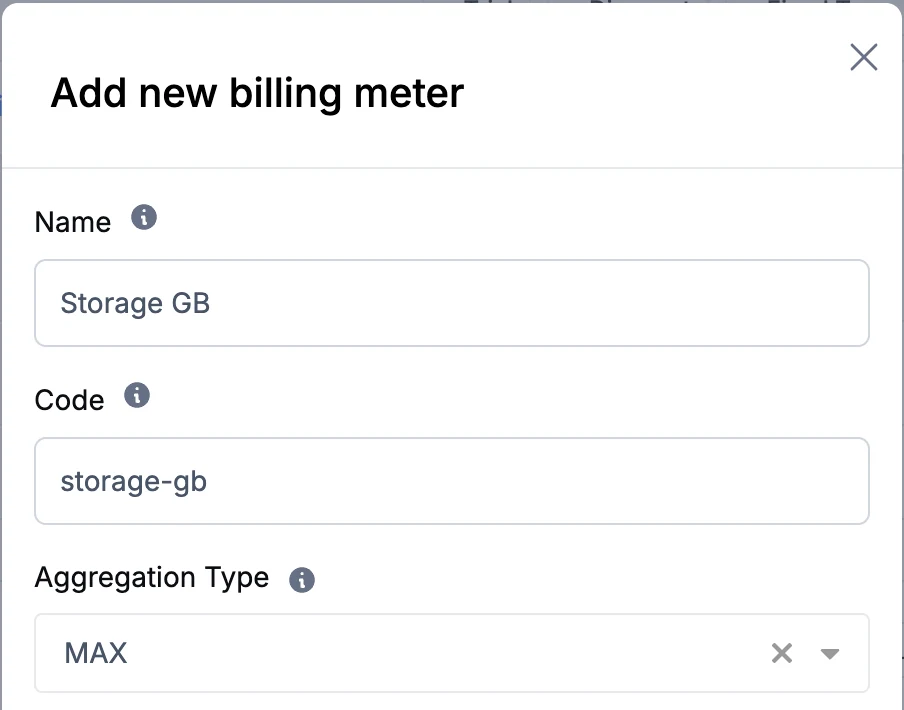 Aviate Metering usage events
POST /plugins/aviate-plugin/v1/metering/billing/{accountId}
[
{
"billingMeterCode": "api_calls",
"subscriptionId": "f3b2a1d4-c5e6-7890-abcd-123456789abc",
"trackingId": "batch-2026-02-14-001",
"timestamp": "2026-02-14T10:00:00Z",
"value": 150
}
]Screenshot from a test environment.
Capabilities
Features for Cloud Billing
Aviate
Meter Every Resource
Create a billing meter for each resource you charge for: GPU hours, compute, storage, bandwidth, API calls, or any unit.
Usage metering →
Aviate
Pick the Right Aggregation
Each meter aggregates its events per billing period: SUM, COUNT, UNIQUE_COUNT, LATEST or MAX. Sum the GPU hours, keep the peak storage.
Metering guide →
Kill Bill
Reserved Capacity Plus On-Demand
Sell a monthly commitment with a recurring plan, and bill what customers use on top with a usage plan.
Usage billing guide →
Aviate
Prepaid Credits
Sell credits upfront, top them off automatically below a threshold, and let them expire.
Prepaid credits →
Kill Bill
Resellers and Sub-Accounts
Make each customer a child account of a reseller. The reseller pays one daily summary invoice for all its customers.
Hierarchical accounts →
Kill Bill
Scale Out and Multi-Tenant
Add stateless nodes as the load grows. Run several brands or regions as tenants of one deployment.
Features →
How It Works
Set Up Cloud Billing in Three Steps
1
Define Meters and Plans
Create a usage plan with its prices and a recurring plan for reserved capacity. With Aviate, add a billing meter per resource with the right aggregation.
2
Send Usage Events
From your scheduler, gateway or monitoring pipeline, send GPU time, storage, egress or API calls to Aviate Metering. With Kill Bill alone, send usage records through the usage API.
3
Invoice and Collect
Kill Bill invoices the reserved fee in advance and the usage at the end of the period, uses Aviate Wallet credits if any, and collects from the customer or from its reseller.
Why Kill Bill
Why Use Kill Bill for Cloud Billing
Kill Bill
Open Source Core
Kill Bill is open source under the Apache 2.0 license. Bring your own gateways, analytics and integrations.
Usage Data Stays With You
Deploy on your own infrastructure. Usage, invoices and payments live in your database.
 MySQL
MySQL MariaDB
 PostgreSQLKill Bill
Any Payment Gateway
Collect with Stripe, Adyen, Braintree, Hyperswitch or your own gateway through payment plugins.
Plugins →
In Production Since 2010
Deployments on the platform have invoiced billions of dollars since 2010.
FAQs
Cloud Billing FAQ
How do I bill GPU hours?
Send the GPU time of each job or instance as usage events to Aviate Metering, on a billing meter that sums the hours. Price the meter in a usage plan, per hour or per block of hours. Kill Bill invoices the total at the end of each billing period. With Kill Bill open source, send the hours as usage records through the usage API instead.
Can I bill GPU usage per second or per minute?
Yes. Send GPU seconds as the event value and price the meter per block of units, for example per block of 60 seconds for a per-minute price, or 3,600 seconds for a per-hour price.
How do I bill storage that goes up and down during the month?
Use a billing meter that keeps the maximum (MAX) or the latest value (LATEST) of the period instead of a sum. With Kill Bill open source, you can also record pre-aggregated values and use CAPACITY usage, billed on the maximum value seen over the period.
Can I combine reserved capacity with on-demand usage?
Yes. The customer has a recurring plan for the reserved capacity and a usage plan for what they consume on top. With the account billing cycle, both appear on the same invoice: the reserved fee billed in advance, the usage billed in arrears.
Can a reseller pay for its customers' usage?
Yes, with hierarchical accounts in Kill Bill. Each customer is a child account of the reseller. When payment is delegated to the parent, Kill Bill adds the children's invoice items to a daily summary invoice for the parent, and the parent pays it.
Can I sell prepaid cloud credits?
Yes, with Aviate Wallet. Customers buy credits, which Kill Bill invoices and collects, and the credits pay for usage invoices. The wallet can top off automatically below a threshold you set, and credits can expire.
How does Kill Bill handle high usage volume?
Kill Bill runs as stateless nodes behind a load balancer, and you add nodes as the load grows. Aviate Metering takes events in batches, and a trackingId makes it safe to resend an event.
Can I run several brands or regions on one deployment?
Yes. Kill Bill is multi-tenant: one deployment runs several tenants, and each tenant has its own catalog, accounts and plugin configuration.
Is there open source usage-based billing software for GPU clouds?
Kill Bill is an open source billing platform under the Apache 2.0 license. It bills usage records that you send per subscription through its usage API, summed per period or priced by the peak value, next to recurring plans. Aviate, the enterprise offering of Kill Bill, adds billing meters on raw events, safe batch ingestion, Aviate Wallet for prepaid credits and Aviate Health.
Ready to Bill Your Cloud by Usage?
Create billing meters in the sandbox, or talk to our team about your resources and resellers.