


Aviate · Native feature
Usage Metering in Aviate
Send raw usage events (API calls, compute hours, tokens, bandwidth) to Aviate Metering. Aviate totals them per billing period and Kill Bill puts them on the invoice, alone or next to a recurring fee.
Usage metering is native to Aviate, the enterprise offering of Kill Bill. It is not part of Kill Bill open source.
Last updated: October 2026
Trusted by companies processing billions in revenue








Short answer
Aviate Metering is the usage metering feature of Aviate, the enterprise offering of Kill Bill. Your services send raw usage events, a billing meter totals them per billing period, and Kill Bill bills the total with the flat or tiered unit prices of a usage plan, in arrears or from prepaid credits held in Aviate Wallet. Without Aviate, Kill Bill open source can still bill usage that you record per subscription through its API.
At a Glance
Usage Metering at a Glance
- What it does
- Turns raw usage events into usage lines on Kill Bill invoices
- Event fields
- Billing meter code, subscription, value, timestamp
- Aggregation
- Per billing meter: SUM, COUNT, UNIQUE_COUNT, LATEST or MAX
- Pricing
- Flat or tiered unit prices, in a usage plan of the catalog
- Billing mode
- In arrears, or from prepaid credits with Aviate Wallet
- Hybrid
- Recurring and usage items on the same invoice
- Open source or Aviate
- Kill Bill open source records usage per subscription through its API. Aviate adds raw events, billing meters and the wallet
Capabilities
Usage-Based Billing Features
Capture usage events, total them per period and invoice them with your plans.
Send Raw Usage Events
Aviate Metering accepts raw usage events, each with a billing meter code, a subscription, a value and a timestamp, and aggregates them for you.
Metering API guide →
Define Billing Meters
A billing meter aggregates the events of each billing period: sum, count, unique count, latest value or maximum. Link the meter to a usage plan in the catalog.
Configure meters →
Bill in Arrears or From Prepaid Credits
Usage is invoiced at the end of the period for actual consumption. With Aviate Wallet, prepaid credits are used first when the invoice is generated.
Wallet guide →
Mix Subscriptions with Usage
A recurring item and a usage item on the same invoice, for example a monthly platform fee plus tiered usage.
Usage billing guide →
Token-Based AI Billing
Record token usage as events. Credits are used at invoicing, and the wallet tops up automatically when the balance falls below a threshold.
AI billing tutorial →
How It Works
From Raw Event to Invoice in Three Steps
1
Create a Billing Meter and a Usage Plan
Create a billing meter, choose how it aggregates events, and link it to a usage plan with flat or tiered unit prices.
2
Send Usage Events
Send events to the Metering API from your application, gateway or agents. Each event carries the meter code, the subscription, a value and a timestamp.
3
Automatic Invoicing
At the end of the billing cycle, Kill Bill writes the usage line, applies the plan prices and generates the invoice. If the account has a wallet, credits are used first.
Worked Example
Billing AI Tokens From Prepaid Credits
One example from the docs, followed end to end: an AI service bills input tokens and sells prepaid credits.
| Setting | Value in the tutorial |
|---|---|
| Billing meter | input-M-tokens, event key input.tokens, SUM |
| Usage plan | usage-monthly: $2.00 per block of 1,000,000 tokens |
| Wallet credit | $10.00 of paid credit |
| Automatic top-off | When the balance falls below $5.00, back to $10.00 |
| Usage events | Token counts with a timestamp, sent for the subscription (100,000 tokens in the tutorial event) |
The AI usage tutorial sets up this account step by step through the API.
Illustration, not a screenshot
Same example as the chart. The top-off is invoiced separately ($6.00) and payment is attempted automatically.
AI Demo CoPlan usage-monthly
Monthly usage invoiceOne billing period
| Item | Amount |
|---|---|
| Input tokens (meter input-M-tokens) 3,000,000 tokens = 3 blocks of 1,000,000 at $2.00 | $6.00 |
| Paid from wallet credit | -$6.00 |
| Amount due | $0.00 |
Wallet before$10.00
After this invoice$4.00
Below $5, automatic top-offback to $10.00
In the Product
The Example in Aviate and Kaui
The same tutorial setup, built in a sandbox: usage plans are edited in the Aviate catalog, wallets in Kaui. Editing a plan creates a new version of that plan, and existing subscriptions keep the old one.
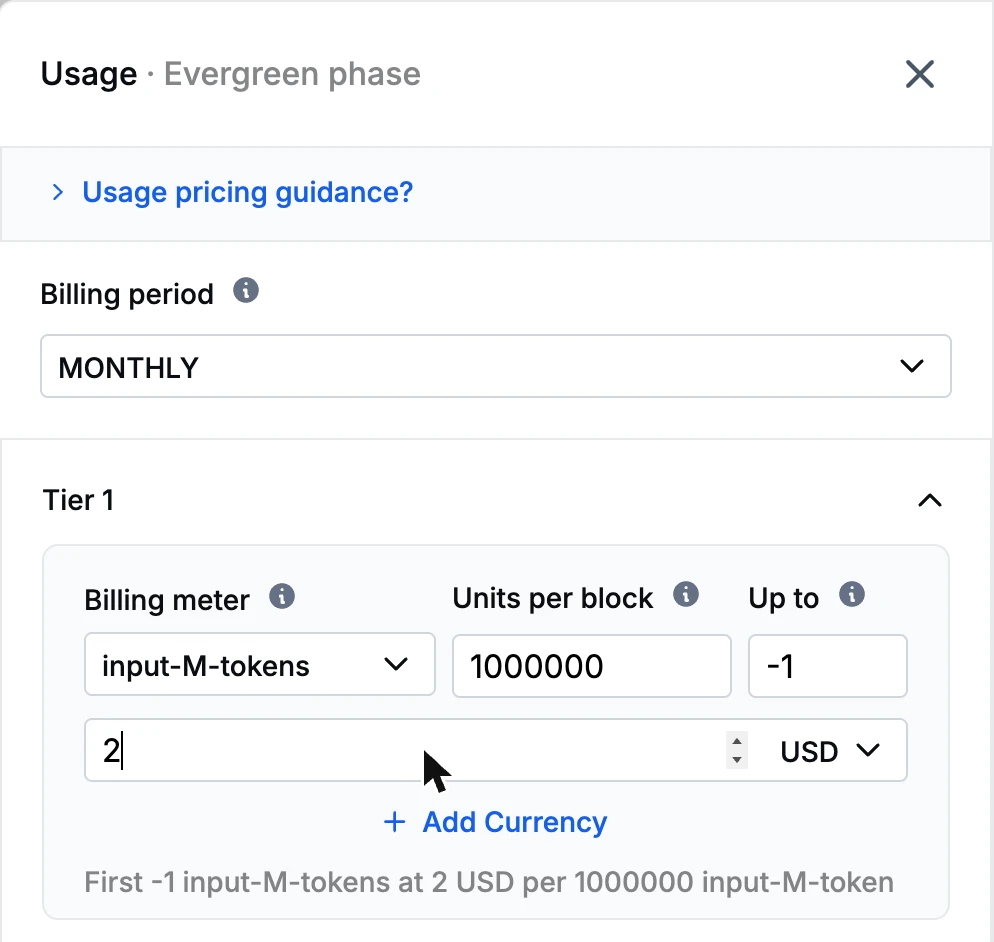
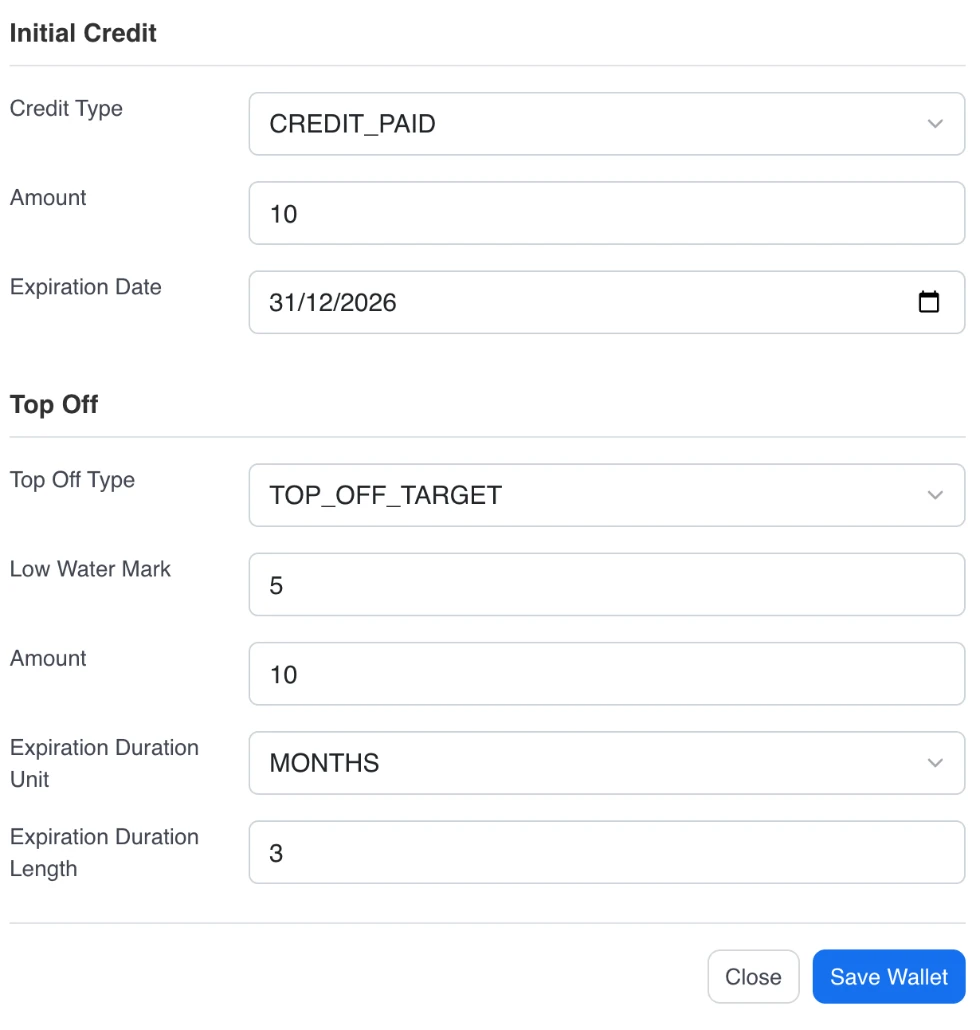
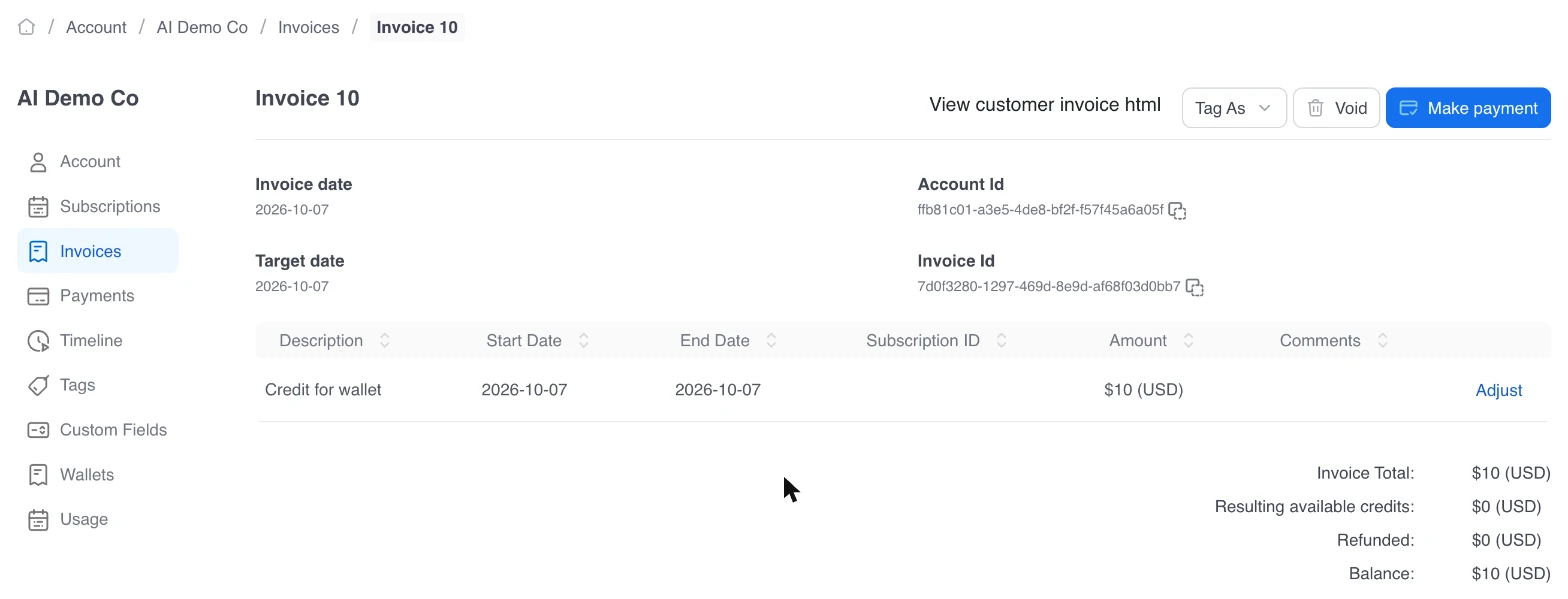

Captured on a sandbox tenant with a demo account, AI Demo Co.
Why Kill Bill
Why Use Kill Bill for Usage Billing
Metering and Billing in One System
Aviate Metering ingests and aggregates events, and Kill Bill prices them on the invoice, next to your subscriptions.
Usage in Kaui and the API
With Aviate, Kaui shows metered usage per subscription. Usage can also be read through the API.
Data Stays With You
Deploy on your own infrastructure. Metering data, usage records, and billing outputs live in your database, under your governance.
 MySQL
MySQL MariaDB
 PostgreSQL
In Production Since 2010
Deployments on the platform have invoiced billions of dollars since 2010.
Typical Setups
How Usage-Based Businesses Set It Up
Cloud and Compute
Meter compute, storage and bandwidth per account, with one usage plan per resource.
NeoCloud use case →
AI APIs
Meter tokens per request and sell prepaid credits that top up automatically.
AI billing use case →
Device Fleets
Meter device usage per account and consolidate charges on a parent account with hierarchical accounts.
Hierarchical accounts →
Example setups, not customer case studies.
FAQs
Usage Metering FAQ
What is the difference between Kill Bill usage tracking and Aviate Metering?
Kill Bill open source records usage per subscription through its API. At high volume, you aggregate it first, for example daily. Aviate Metering accepts raw events and totals them for you with billing meters.
Can I combine metered usage with recurring subscriptions on one invoice?
Yes. A customer can have a recurring plan, such as a monthly platform fee, and a usage plan. The recurring item and the usage item appear on the same invoice.
How does prepaid credit work with usage metering?
Aviate Wallet holds prepaid credits for each account. Credits are used when the usage invoice is generated. When the balance falls below a threshold you set, the wallet tops up automatically: Kill Bill invoices the top-off and attempts payment automatically.
What aggregation methods are available?
Each billing meter uses one aggregation per billing period: SUM, COUNT, UNIQUE_COUNT, LATEST or MAX. Kill Bill open source also supports CAPACITY usage, billed on the maximum value seen over the period.
Is usage billed in advance or in arrears?
Usage is billed in arrears, at the end of each billing period. To charge upfront, sell prepaid credits with Aviate Wallet.
Ready to Bill for Usage?
See how Kill Bill meters and invoices usage. Start with the sandbox or talk to our team.