


Platform · Open source and Aviate
Billing Catalog for Plans and Pricing
The catalog tells Kill Bill what you sell and how much to charge: products, plans, phases, billing periods and prices in every currency you support. Kill Bill reads it on every invoice.
 Kill Bill open source: the catalog
 Aviate: catalog UI, plan APIs, coupons
Last updated: October 2026
Trusted by companies processing billions in revenue








Short answer
The Kill Bill catalog defines what you sell: products, plans, plan phases such as a trial, billing periods and prices in each currency. It is part of Kill Bill open source, written as an XML file and uploaded per tenant through the API. Each upload adds a version with an effective date, so you can change prices without redeploying and decide when existing subscribers move to the new price. Aviate, the enterprise offering of Kill Bill, adds a catalog UI, plan-level APIs that create versions automatically, and coupons.
At a Glance
The Catalog at a Glance
- What it does
- Defines what customers can buy and how much Kill Bill charges for it
- Products
- BASE, ADD_ON or STANDALONE
- Plan phases
- TRIAL, DISCOUNT, FIXEDTERM, EVERGREEN, each with its own duration and price
- Billing periods
- From DAILY to TRIENNIAL, for example WEEKLY, MONTHLY, QUARTERLY or ANNUAL, or NO_BILLING_PERIOD for one-time charges
- Currencies
- One catalog, with a value for every currency it supports
- Versions
- Each version has an effective date. A price change can be deferred for existing subscriptions
- Plan changes
- Immediately, at the end of the term, or not allowed (IMMEDIATE, END_OF_TERM, ILLEGAL). Catalog rules set the default and the API call can override it. Immediate changes are prorated
- Per-customer prices
- Price overrides per subscription, for fixed, recurring or usage prices
- Open source or Aviate
- The catalog is open source. Aviate adds the catalog UI, plan-level APIs and coupons
Open Source and Aviate
What Each Edition Gives You
Both editions bill from the same catalog model. Aviate changes how you edit it.
| Kill Bill open source | Aviate | |
|---|---|---|
| How you edit | XML file, uploaded per tenant through the API | Catalog UI and plan-level APIs. XML upload is turned off, and the catalog can be exported as XML |
| Versions | You upload a new version with an effective date | A new version is created every time a plan is modified, for example a price change |
| Existing subscribers | A price change can be deferred for them with effectiveDateForExistingSubscriptions | By default they keep their original plan version. The plan API can set effectiveDateForExistingSubscriptions to move them later |
| Retiring a plan | Remove it from a later version. Existing subscriptions can still refer to it | Archive it: no new subscriptions, existing ones continue |
| Per-customer prices | Price overrides per subscription | Price overrides per subscription |
| Coupons | Not included | Aviate Coupons, managed through the API |
| Usage prices | Flat or tiered usage prices in the plan phase | Usage plans in the catalog UI, linked to Aviate Metering |
Capabilities
What You Can Define in the Catalog
Products and Plans
A product is what the customer buys. Each product has one or more plans, for example a monthly plan and an annual plan. Add-on products attach to a base product.
Catalog guide →
Multi-Phase Plans
A plan can start with a trial or a discount phase and move to an evergreen phase. Each phase has its own duration, price and payment term. Subscriptions move through phases automatically.
Plan phases →
Billing Periods and Currencies
Bill daily, monthly, annually or on other periods. Every price lists a value for each currency of the catalog, so one catalog serves all your regions.
Billing periods →
Catalog Versions
Each version has an effective date. New subscriptions use the new price from that date, and you choose when existing subscriptions follow.
Catalog versions →
Plan Changes and Proration
Catalog rules decide whether a plan change happens immediately, at the end of the term, or not at all. When a change is immediate, Kill Bill credits the unused part of the old plan and charges the new plan for the rest of the period.
Change policies →
Coupons in Aviate
Percentage or fixed-amount coupons, with an optional expiration date, a maximum number of uses and a list of eligible plans. Applied when the subscription is created.
Coupons guide →
How It Works
From Catalog to Invoice in Three Steps
1
Define the Catalog
Write products, plans, phases and prices in an XML catalog and upload it through the API, or create them in the Aviate catalog UI.
2
Subscribe Customers to Plans
Each subscription points to a plan. Kill Bill moves it from phase to phase, for example from the trial to the paid phase, without any code on your side.
3
Invoice and Change
Kill Bill reads the catalog to generate each invoice. Immediate plan changes are prorated, and price changes go through a new catalog version.
Worked Example
One Product, Three Plans
The demo product Cloud Platform, followed from the catalog to an upgrade and a price change.
| Plan | Phases and price |
|---|---|
| starter-monthly | Trial of 14 days at $0, then $49 a month |
| growth-monthly | $199 a month |
| scale-annual | $7,990 a year |
Demo prices from a sandbox tenant. All three plans belong to the BASE product cloud-platform.
Illustration, not a screenshot
An immediate upgrade in the middle of a monthly period, billed in advance. The next invoice, on December 1, is $199.
Upgrade on November 11Starter monthly to Growth monthly
Billing periodNov 1 to Dec 1 (30 days)
| Item | Amount |
|---|---|
| Credit for the unused part of Starter monthly $49 × 20/30 days | -$32.67 |
| Growth monthly, from Nov 11 to Dec 1 $199 × 20/30 days | $132.67 |
| Amount due | $100.00 |
In the Product
The Same Plan in XML and in Aviate
Starter monthly from the worked example, written as a Kill Bill XML catalog and built in the Aviate catalog UI.
Kill Bill open source XML catalog<catalog xmlns:xsi="http://www.w3.org/2001/XMLSchema-instance"
xsi:noNamespaceSchemaLocation="https://docs.killbill.io/latest/catalog.xsd">
<effectiveDate>2026-08-19T08:31:47+00:00</effectiveDate>
<catalogName>CloudPlatform</catalogName>
<recurringBillingMode>IN_ADVANCE</recurringBillingMode>
<currencies>
<currency>USD</currency>
</currencies>
<products>
<product name="cloud-platform">
<category>BASE</category>
</product>
</products>
<!-- rules and price lists omitted -->
<plans>
<plan name="starter-monthly">
<product>cloud-platform</product>
<initialPhases>
<phase type="TRIAL">
<duration><unit>DAYS</unit><number>14</number></duration>
<fixed><fixedPrice>
<price><currency>USD</currency><value>0</value></price>
</fixedPrice></fixed>
</phase>
</initialPhases>
<finalPhase type="EVERGREEN">
<duration><unit>UNLIMITED</unit></duration>
<recurring>
<billingPeriod>MONTHLY</billingPeriod>
<recurringPrice>
<price><currency>USD</currency><value>49.00</value></price>
</recurringPrice>
</recurring>
</finalPhase>
</plan>
</plans>
</catalog>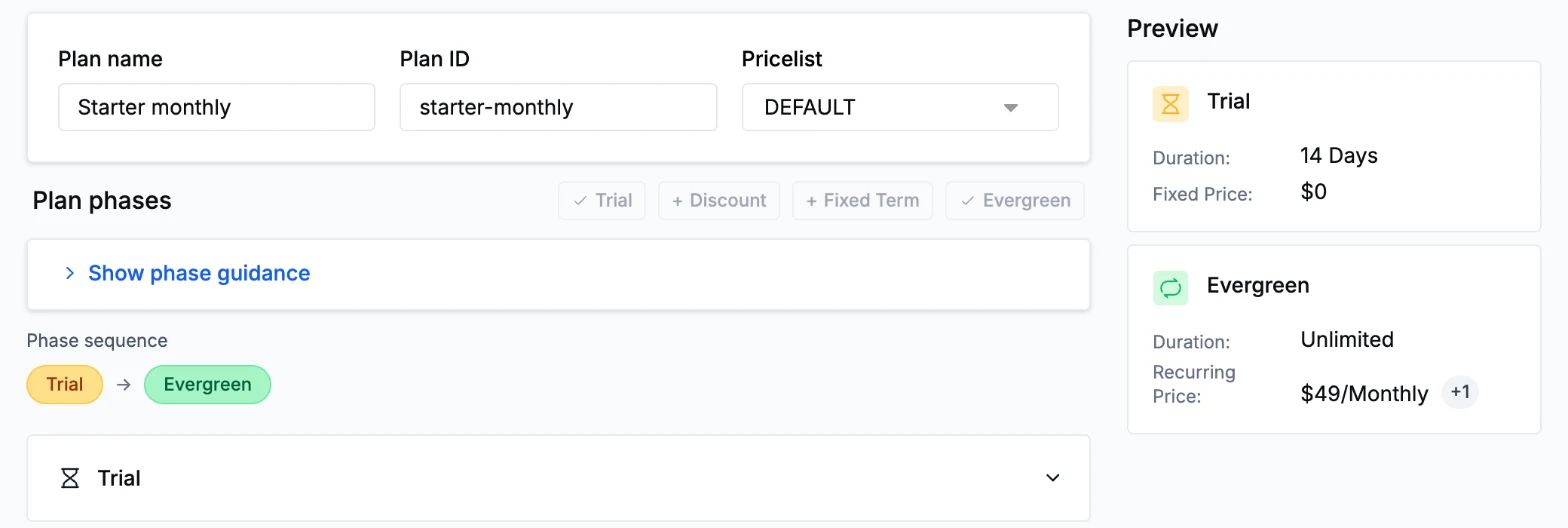
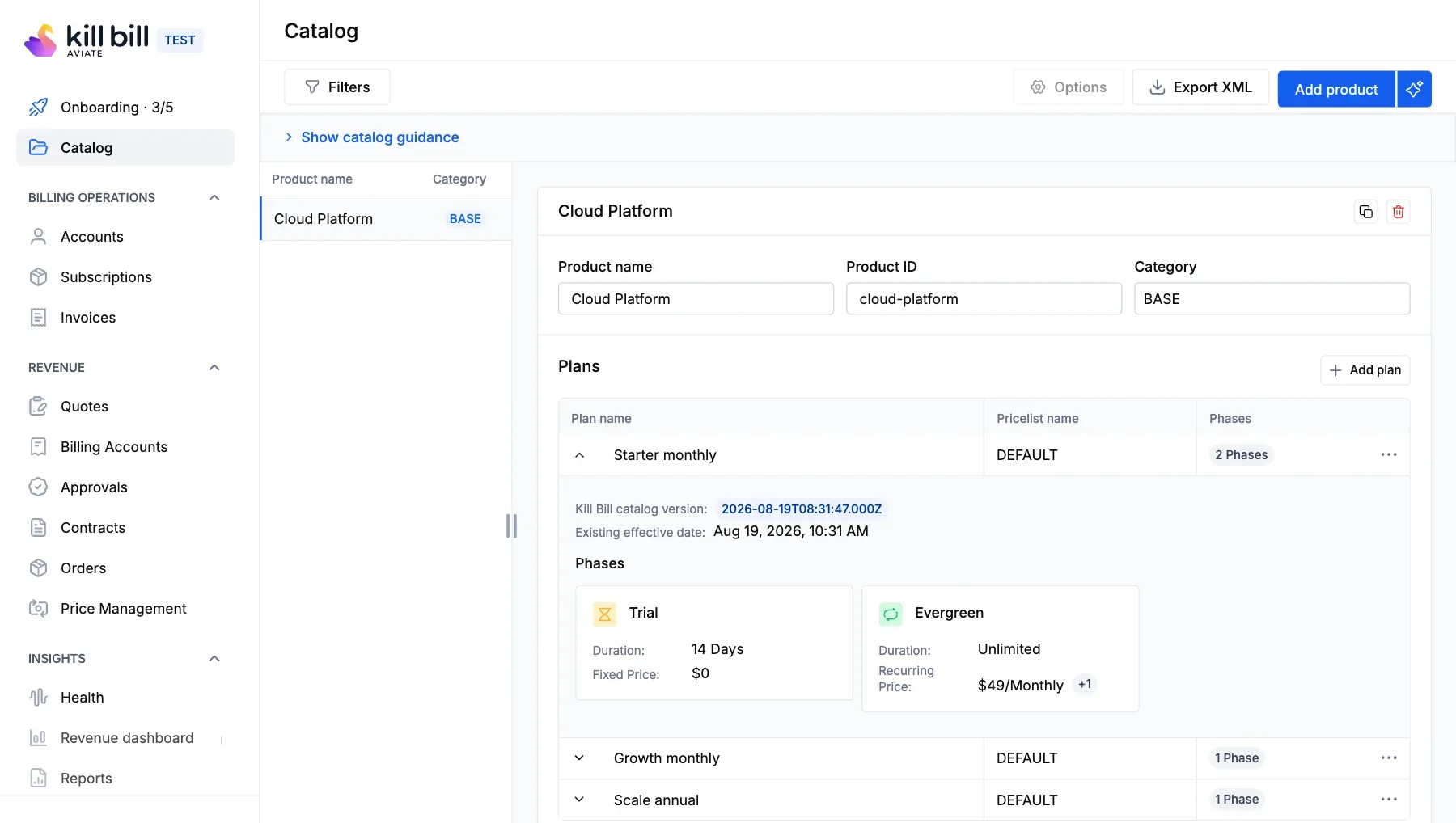
Captured on a sandbox tenant. Demo prices.
Why Kill Bill
Why Teams Use the Kill Bill Catalog
Change Prices Without Redeploying
Upload a new catalog version through the API, or edit the price in Aviate. Your application code does not change.
Existing Customers Protected
Versions keep the price each subscriber signed up for until you decide otherwise.
Open Source Foundation
The catalog engine is open source under the Apache 2.0 license. Each tenant has its own catalog, stored in your database.
 MySQL
MySQL MariaDB
 PostgreSQL
In Production Since 2010
Deployments on the platform have invoiced billions of dollars since 2010.
FAQs
Billing Catalog FAQ
Can I change prices for existing subscribers?
Yes. Add a catalog version with the new price. New subscriptions use it from the version's effective date. A separate date, effectiveDateForExistingSubscriptions, sets when existing subscriptions move to the new price. Without it, existing subscriptions keep the price they signed up for.
How does the Aviate catalog differ from the open source catalog?
The open source catalog is an XML file that you upload per tenant. Aviate stores the catalog in its own tables and lets you create and edit plans in a UI or through plan-level APIs. A new version is created every time a plan is modified, and the catalog can be exported as XML.
Can a plan combine a recurring price and usage-based prices?
Yes. A plan phase can have a fixed price, a recurring price and usage prices. The recurring and usage items appear on the same invoice.
Can I give one customer a different price?
Yes. When you create a subscription or change its plan, you can override the fixed, recurring or usage price of a phase for that subscription only. The catalog stays the same for everyone else.
Do I need to redeploy to change prices?
No. Upload a new catalog version through the API, or edit the price in the Aviate catalog. Your application code does not change.
How are multiple currencies handled?
Every price in the catalog lists a value for each currency the catalog supports. The account's currency decides which price is used. You keep one catalog for all regions instead of one catalog per currency.
Ready to Build Your Catalog?
Create a product and its plans in the sandbox, or talk to our team about your pricing.