Subscription Billing

Ship New Pricing Models Without Rebuilding Your Billing Stack

Kill Bill is an open-source subscription billing platform, released under the Apache 2.0 license and in production since 2010. You describe products, plans, trials and add-ons in a catalog. Kill Bill creates the subscriptions, applies plan changes, generates the invoices and collects payment through your gateway.

When pricing changes, you update the catalog. Your application code stays the same.

Usage-based billing for AI tokens, API calls and compute hours, recorded through the API and priced by tier
Recurring, one-time and usage charges on the same invoice
Multi-tenant billing, with a separate catalog and settings per tenant

Last updated: October 2026

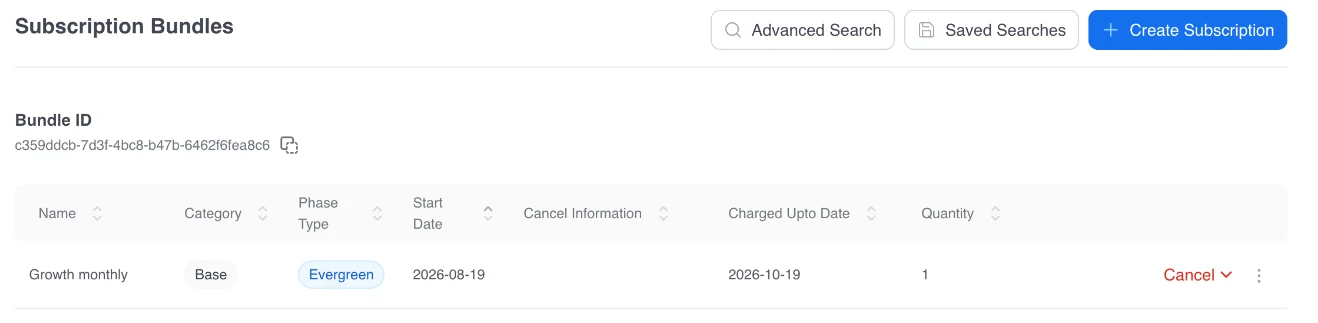
Kaui, the Kill Bill admin UI: a customer subscribed to the Growth monthly plan, in its evergreen phase, with its start date and the date it is charged through.
Kaui, the admin UI that ships with Kill Bill. Demo data.
At a Glance

Subscription Billing at a Glance

What it does
Manages the subscription lifecycle: catalog, subscriptions, plan changes, invoices, payments and overdue accounts
Pricing models
Flat recurring, one-time fees, trials and multi-phase plans, tiered usage, seat-based quantities, add-ons and bundles
Catalog
Products, plans, phases and price lists, versioned by effective date, one catalog per tenant
Plan changes
Immediate or at end of term, set by catalog rules
Invoices
Generated on each billing cycle. Changes are credited and charged on the next invoice
Payments
Payment plugins for Stripe, Braintree (including PayPal), Adyen and others
Tax
Avalara AvaTax, Vertex and Kintsugi plugins, or Aviate Tax (Tax & Compliance)
Reporting
MRR, churn, subscription, invoice and payment reports in Kaui
Localization
Several currencies per catalog, time zones, invoice and email templates per language
Interfaces
REST API and Kaui, the admin UI

Open-source payment and tax plugins for Kill Bill

How It Works

How a Subscription Is Billed

YOU DEFINE RUNS EACH STEP 1. Catalog Products, plans, phases, price lists Per tenant 2. Subscription Phase, billing day and charged-through date Trial, discount, evergreen 3. Invoice On each billing cycle. Changes credited next Recurring, one-time, usage, tax 4. Payment Through your payment plugin
Kill Bill runs steps 2 to 4 for every subscription. You define the catalog once.
1

Catalog

You define products, plans and phases once, per tenant.

2

Subscription

A customer subscribes to a plan. Kill Bill tracks its phase, its billing day and the date it is charged through.

3

Invoice

On each billing cycle, Kill Bill generates the invoice. When the subscription changes, the next invoice credits the unused part and charges the new plan.

4

Payment

Kill Bill charges the invoice through your payment plugin and records the result.

Model Your Pricing in the Catalog

Products, Subscriptions, and Add-Ons

The catalog holds subscription plans and one-off products
Product tiers
Variety of subscription types (main subscription, add-on subscriptions, etc.)
Limit add-ons to some plans. When a customer changes plan, Kill Bill cancels add-ons the new plan does not allow.

Rules

Catalog rules to determine system behavior when a plan is created, cancelled, or changed
Make catalog changes and specify how and when they apply to new and existing subscriptions
Automatic cancellation of plans based on business rules
Plan change rules to determine when to apply upgrades and downgrades

Prices

Multiple phases can have different price and payment terms (Example: $0 trial period followed by $2.99/month for six months, which transitions to an evergreen subscription for $5.99/month)
Price lists with plan change rules to give special pricing to certain customers (Example: Show a discounted price list to referral customers who visit your website via a specific link)

Billing

Support for one-time charges (Examples: equipment fee, set-up fee, etc.)
Subscription bundles to bill multiple subscription types as one
Plan Changes

Plan Changes and Billing Alignment

Catalog rules decide when a plan change applies and on which day each subscription is billed. Kill Bill applies them to every subscription, with no code in your application.

When does a plan change apply?
PolicyWhat happens
IMMEDIATEThe change applies now. For plans billed in advance, Kill Bill credits the unused part of the old plan and charges the new one. Any surplus becomes account credit.
END_OF_TERMThe change applies at the end of the current billing period.
ILLEGALThe change is not allowed.
When is a subscription billed?
AlignmentBilled on
ACCOUNTThe account's billing day. Subscriptions can share one invoice. A subscription that starts on another day is prorated for its first period.
BUNDLEThe base subscription's billing day, for its add-ons.
SUBSCRIPTIONIts first billed day, after any trial. No proration at the start. Billed on its own invoices.
Invoice 1 Start of period Old plan, billed in advance for the full period Invoice 2 After the upgrade Credit: unused part of the old plan Charge: new plan, to the end of the period Upgrade, IMMEDIATE Period start Change date Period end Any surplus of credit over the new charge becomes account credit.
An upgrade in the middle of a period, for a plan billed in advance. Illustration, no real amounts.

Automate Invoicing from Signup to Settlement
Automatic invoice generation on each billing cycle, ready for payment
Credits on upgrades, downgrades and immediate cancellations, plus account credits and item adjustments
Billing models: fixed recurring, one-time charges, usage-based, seat-based
Tax lines on invoices through tax plugins (Tax & Compliance)
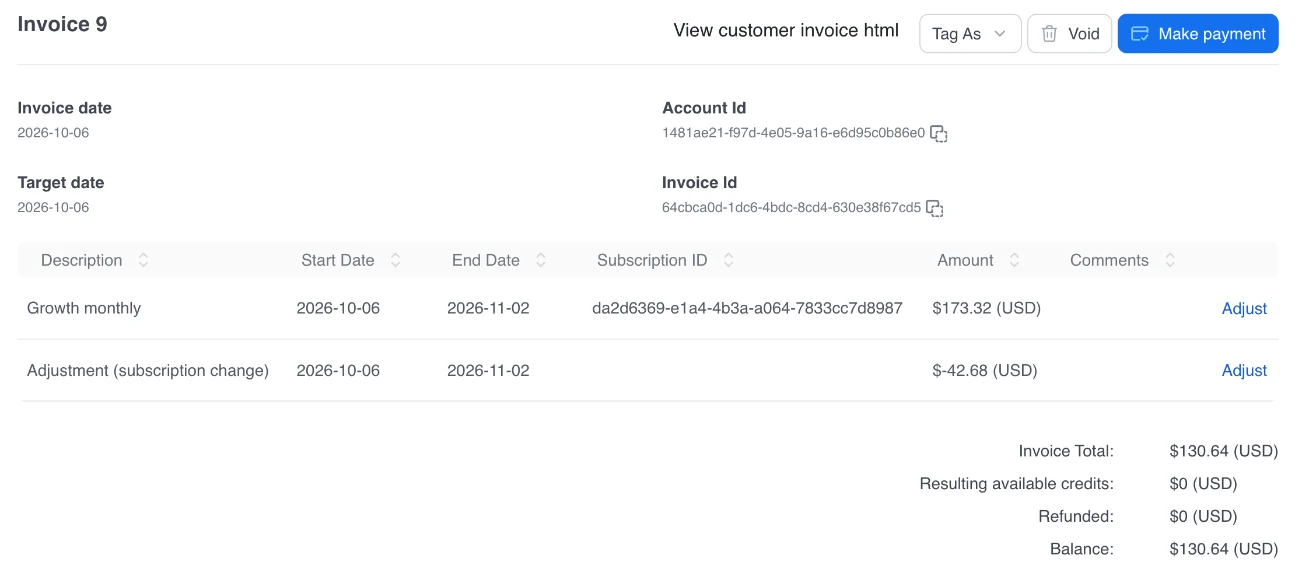
Kaui invoice after an immediate upgrade: the new Growth monthly plan charged to the end of the period, and an adjustment line that credits the unused part of the old plan.
Invoice issued after an immediate upgrade: the new plan to the end of the period, and a credit for the unused part of the old plan. Demo data.
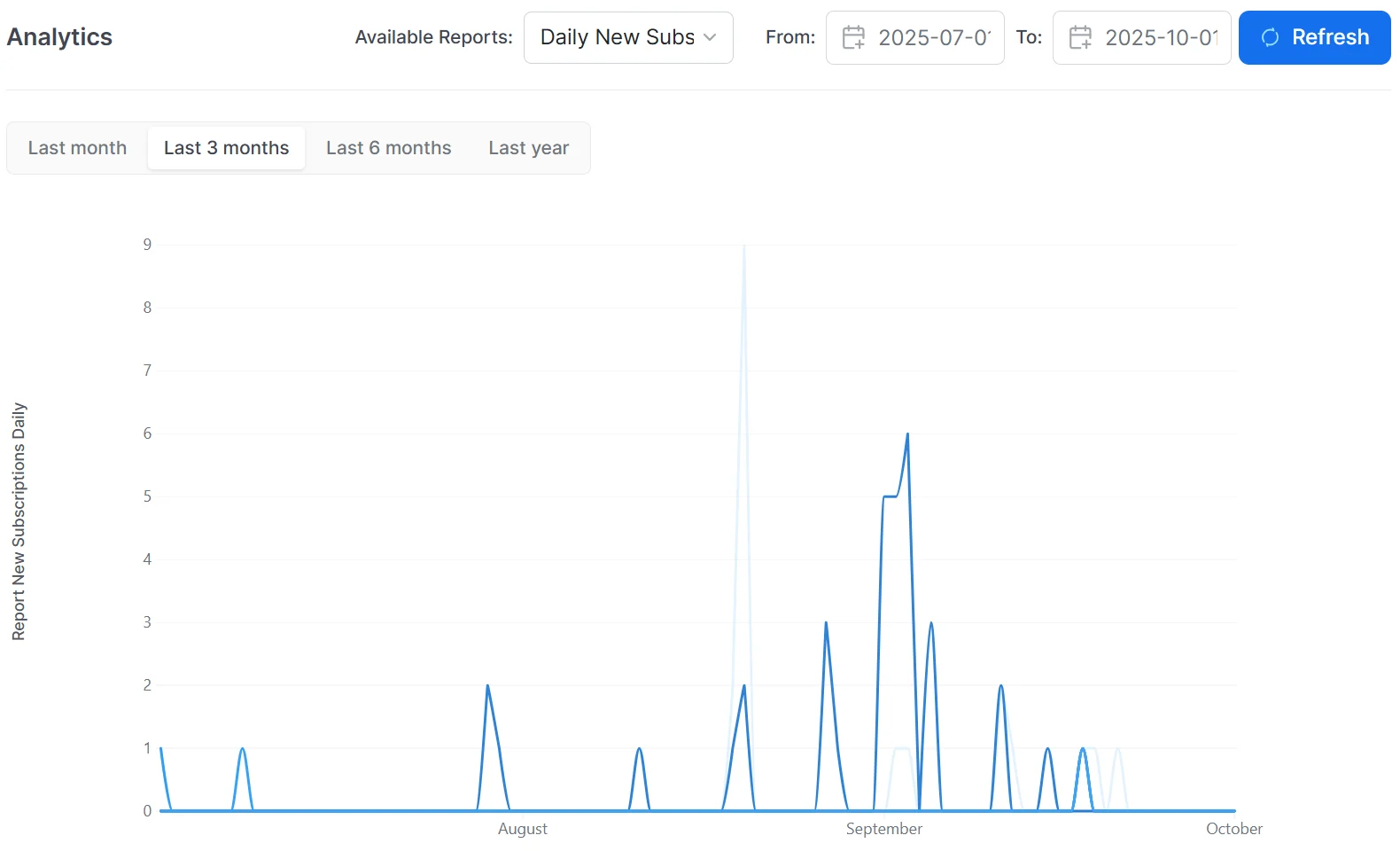
Kaui analytics: a daily new subscriptions report over the last three months.
Daily new subscriptions report from the analytics plugin, in Kaui. Demo data.

Reports and Localization

MRR, churn, subscription, invoice and payment reports with the open-source analytics plugin, plus your own SQL reports in Kaui
Several currencies, time zones, and invoice and email templates in several languages
Aviate

Kill Bill and Aviate

Kill Bill is the open-source billing engine. Aviate is the enterprise offer built on it by the same team. For subscription billing, Aviate adds a web interface to edit the catalog, prepaid credits with Aviate Wallet, usage metering, and Level 3 support from the engineers who build the platform.
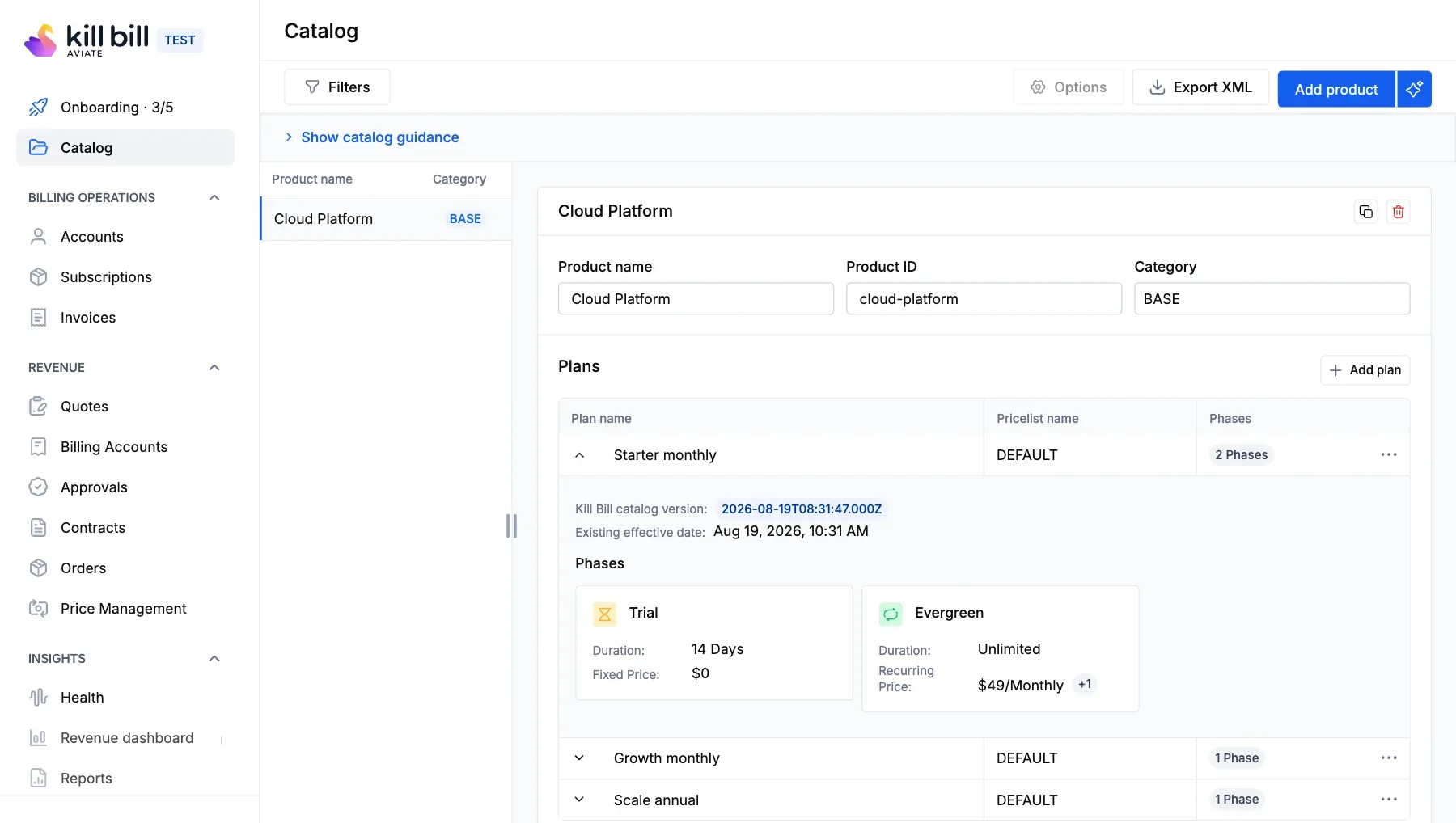
Aviate catalog editor: a product with three plans; the Starter monthly plan shows a 14-day trial phase and an evergreen phase.
Catalog editor in Aviate. Demo data.
FAQs

Frequently Asked Questions

What is subscription billing in Kill Bill?
Kill Bill manages recurring charges from a catalog of products and plans. It creates subscriptions, moves them through their phases, generates invoices on each billing cycle and collects payment through a payment plugin.
Which pricing models does Kill Bill support?
Flat recurring prices, one-time fees, trials and multi-phase plans, tiered usage pricing, seat-based quantities, add-ons and bundles. They can be combined on one invoice.
How do upgrades and downgrades work?
Catalog rules decide whether a change applies immediately or at the end of the term. With an immediate change on a plan billed in advance, the next invoice credits the unused part of the old plan and charges the new one.
Can several subscriptions share one invoice?
Yes. With ACCOUNT alignment, subscriptions are billed on the account's billing day and can appear on the same invoice.
Can I pause or cancel a subscription?
Yes. You can pause and resume billing and service for a bundle of subscriptions. A cancellation applies immediately or at the end of the term.
What happens when a payment fails?
Kill Bill retries the payment on a schedule you configure. If invoices stay unpaid, the overdue system moves the account through states you define, which can block plan changes, stop billing or cancel subscriptions.
Kill Bill logo app

See How Kill Bill Bills a Subscription

Explore how Kill Bill handles catalog changes, hybrid pricing, and complex billing models without turning every pricing change into an engineering project.