


Platform · Payments
One Payment API for Every Gateway
Kill Bill sits in front of your payment gateways. Your app calls one API, and payment plugins talk to Stripe, Adyen, Braintree or the gateway you choose. Retries, refunds and chargebacks work the same way for all of them.
 Kill Bill (open source): payment API, gateway plugins, retries, refunds
 Aviate (enterprise): payment settings UI, prepaid credits, Level 3 support
Last updated: October 2026
Trusted by companies processing billions in revenue








Short answer
What is an open source payment platform, and what does Kill Bill do?
Kill Bill is an open source billing and payments platform. Its payment API gives your app and its invoicing engine one way to authorize, capture, charge, refund and record chargebacks, whatever the gateway. Payment plugins connect to Stripe, Adyen, Braintree and Hyperswitch, and you can write your own. An account can hold several payment methods on different gateways. Card data is tokenized by the gateway, failed payments are retried on a schedule you set, and every transaction keeps an audit log. Kill Bill can also run as a payment layer on its own, without subscriptions. Aviate, its enterprise offering, adds payment settings in its UI, prepaid credits and Level 3 support.
Kill Bill and Aviate
Who Does What for Payments
Aviate runs on top of Kill Bill. With Aviate, you keep everything in the left column and add the right one.
Kill BillOpen source, Apache 2.0. Free, installed and run by you, without support or SLA.
- Payment APIAuthorize, capture, purchase, void, refund, credit, chargeback
- Payment pluginsAdyen, Braintree, Hyperswitch, Stripe, or your own
- Several payment methods per accountOn one or more gateways, with a default method
- Payment control pluginsAbort, change the amount or the method, schedule retries
- Retries, dunning, refunds, chargebacksRetry schedule per tenant, overdue states, invoice adjustments
- External payments, audit logs, push notifications
AviateThe enterprise offering of Kill Bill. Licensed, with Level 3 support from the engineers.
- Payment settings in AviatePayment and payment retry settings per tenant, in the UI
- Aviate WalletPaid credits create an invoice and a payment on the default method
- Aviate HealthNode metrics, stuck bus and notification entries
- Level 3 supportThe engineers, on a dedicated Slack channel. First response within 1 business day for a P1
Features specific to one edition are tagged Kill Bill or Aviate. Untagged items apply to both.
At a Glance
Payments at a Glance
- Transactions
- AUTHORIZE, CAPTURE, PURCHASE, VOID, REFUND, CREDIT, CHARGEBACK, and chargeback reversals
- Statuses
- SUCCESS, PENDING, PAYMENT_FAILURE, PLUGIN_FAILURE, UNKNOWN. A janitor asks the plugin again for PENDING and UNKNOWN, and leaves UNKNOWN for manual review if it still cannot tell
- Plugins
- Open source plugins for Adyen, Braintree, Hyperswitch and Stripe, or your own
- Payment methods
- Several per account, on one or more gateways. The default method pays invoices
- Card data
- Client-side tokenization or a hosted payment page. Kill Bill keeps the gateway token
- Multi-step payments
- A PENDING status for flows that need a completion step, such as 3D Secure or a hosted page
- Retries
- Failed invoice payments retried on a schedule set per tenant, by default three retries, 8 days apart. Plugin errors are retried after 5 minutes, then at growing intervals
- Dunning
- Overdue states that can block plan changes, pause the service, or cancel subscriptions
- Duplicates
- Once an invoice payment succeeds, scheduled retries are cancelled, so retries cannot pay an invoice twice
- Offline payments
- Checks and wires recorded as external payments
- Payments only
- Kill Bill can run as a payment layer in front of your gateways, without subscriptions
Payment Needs
Payment Needs and How to Meet Them
Common payment needs, and the Kill Bill and Aviate features behind each one.
| Need | Example | How to set it up | Edition |
|---|---|---|---|
| One-off charge | A $15 accessory | A PURCHASE through the payment API, or an external charge on an invoice | Kill Bill |
| Subscription payments | Monthly invoices paid by card | Invoices are paid automatically with the default payment method, unless the account is tagged AUTO_PAY_OFF | Kill Bill |
| Authorize, then capture | Capture when the order ships | An AUTHORIZE, then one or more CAPTURE transactions, or a VOID | Kill Bill |
| Card tokens | Keep card numbers out of your systems | Client-side tokenization or a hosted payment page. Security | Kill Bill |
| 3D Secure | A bank asks for confirmation | A PENDING payment completed after the challenge, where the plugin supports it | Kill Bill |
| Several gateways | Cards on Stripe, debit on another gateway | Payment methods on different plugins for the same account | Kill Bill |
| Routing rules | Send EUR cards to one gateway | A payment control plugin that sets the payment method, or the Hyperswitch plugin | Kill Bill |
| Failed payments | Retry a declined card | Retry schedule per tenant, then dunning rules | Kill Bill |
| Refunds and disputes | A partial refund, a chargeback | REFUND and CHARGEBACK transactions, with invoice adjustment | Kill Bill |
| Offline payments | A customer pays by wire | An external payment on the invoice | Kill Bill |
| Prepaid credits | Credits bought upfront | Aviate Wallet: paid credits create an invoice and a payment. Prepaid credits | Aviate |
| Settings without code | Change the retry schedule | Payment and payment retry settings per tenant in Aviate | Aviate |
Worked Example
A Declined Renewal, Then a Retry
A $199 monthly invoice is charged on 2 November. The card is declined, and Kill Bill tries again on the default schedule.
Illustration, not a screenshot
The retry reuses the payment method of the first attempt. If it had failed again, the next tries would follow on the same schedule.
Invoice of 2 NovemberGrowth monthly, USD, demo price
$199.00paid by card
| Attempt | Result |
|---|---|
| 2 Nov, PURCHASE default card, through the payment plugin | PAYMENT_FAILURE |
| 10 Nov, retry 8 days later, same payment method | SUCCESS |
| Invoice balance | $0.00 |
| Step | What Kill Bill does |
|---|---|
| 1. Charge | Calls the payment plugin with a PURCHASE for $199.00 on the account's default payment method |
| 2. Decline | Records the transaction as PAYMENT_FAILURE and sends PAYMENT_FAILED and INVOICE_PAYMENT_FAILED events to your push notification URL, if one is registered |
| 3. Schedule | Plans a retry after 8 days, from the retry schedule of the tenant |
| 4. Retry | Charges again on 10 November and records SUCCESS. The invoice is paid |
| 5. Dunning | While the invoice stays unpaid, overdue rules move the account through its states, based on how long it has been unpaid |
Once the invoice is paid, any scheduled retry is cancelled. When a gateway does not answer, the transaction is marked UNKNOWN and the janitor asks the plugin for the final status.
In the Product
Payment Plugins in Aviate and an Invoice in Kaui
Aviate lists the payment plugins you can install. In Kaui, an invoice shows its payments, and you can make a payment or adjust an item.
Aviate plugins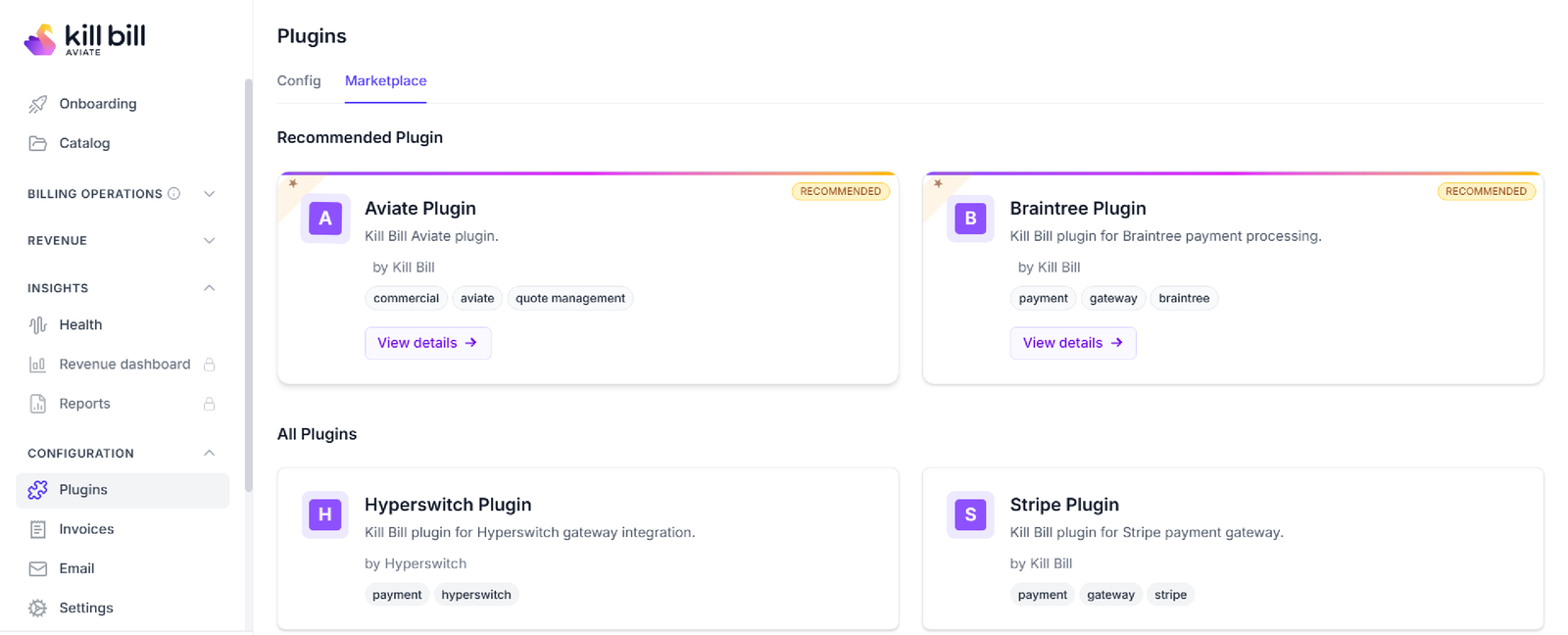 Kaui invoice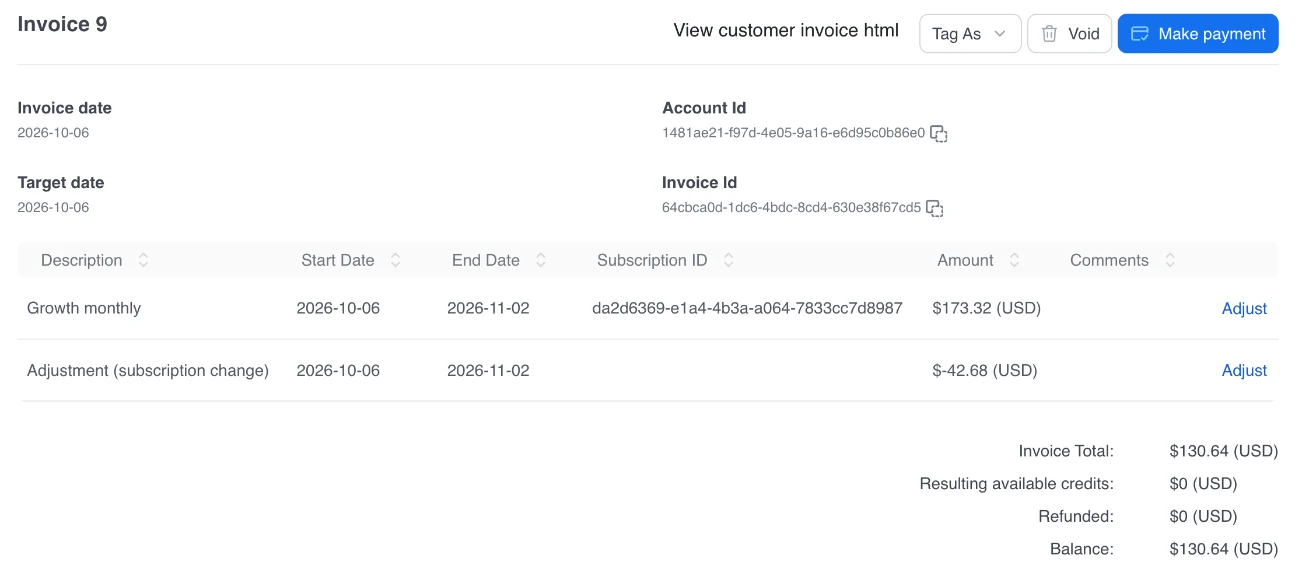
Screenshots from a test environment.
Capabilities
Payment Features
Kill Bill
One Payment API
Authorize, capture, purchase, void, refund, credit and record chargebacks the same way on every gateway.
Payment guide →
Kill Bill
Gateway Plugins
Open source plugins for the gateways below, or your own plugin for another processor.
 Stripe
 BraintreeHyperswitchKill Bill
Payment Control Plugins
Abort a payment, change its amount or payment method, or schedule a retry, with your own rules.
Control plugins →
Kill Bill
Retries and Dunning
Retry failed payments on your schedule. Overdue rules then block changes or pause the service.
Dunning guide →
Kill Bill
Refunds and Chargebacks
Full or partial refunds with invoice adjustment. Chargebacks and their reversals as payment transactions.
API reference →
Aviate
Payment Settings in Aviate
Set payment and payment retry settings per tenant from the Aviate interface.
Tenant settings →
How It Works
Set Up Payments in Three Steps
1
Install the Payment Plugins
Install the plugin for each gateway, and upload its credentials per tenant.
2
Add Payment Methods
Tokenize the card in the browser or on a hosted page, then save the token as a payment method on the account.
3
Charge, Retry, Refund
Invoices are paid on the default method. Set the retry schedule and the dunning rules, and refund through the API or Kaui.
Why Kill Bill
Why Use Kill Bill for Payments
Kill Bill
Open Source Core
Kill Bill is open source under the Apache 2.0 license. No fee per transaction, and no share of your revenue.
Payment Data Stays With You
Deploy on your own infrastructure. Payments, tokens and audit logs live in your database.
 MySQL
MySQL MariaDB
 PostgreSQLKill Bill
Change Gateways Without Rewriting
Your app calls the Kill Bill payment API. Adding a gateway means adding a plugin, with no change to your payment calls. Moving saved cards to a new gateway still needs a token migration between the gateways.
Plugins →
In Production Since 2010
Deployments on the platform have invoiced billions of dollars since 2010.
FAQs
Payments FAQ
Which payment gateways does Kill Bill support?
Kill Bill connects to gateways through payment plugins. Open source plugins exist for Adyen, Braintree, Hyperswitch and Stripe. You can write your own plugin for another gateway or processor.
Can I use Kill Bill for payments only, without subscriptions?
Yes. Kill Bill can run as a payment layer in front of your gateways. Your app calls the payment API for one-off charges, and the subscription and invoicing features stay unused.
Can one customer have payment methods on several gateways?
Yes. An account can hold as many payment methods as needed, on one or more payment plugins. One of them is the default method, which pays invoices, and each payment call can name another one.
Does Kill Bill store card numbers?
With client-side tokenization or a hosted payment page, the card goes to the gateway and Kill Bill keeps the token it returns. Server-side tokenization is also possible, but then Kill Bill and your other systems that receive or transmit card data are in your PCI DSS scope.
Does Kill Bill support 3D Secure?
Kill Bill supports multi-step payments: the transaction stays PENDING until a completion step, such as 3D Secure or a hosted payment page, finishes. Whether 3D Secure is available depends on the payment plugin and the gateway. The Braintree plugin, for example, supports cards with or without 3D Secure.
Can Kill Bill route payments between gateways?
Not out of the box. A payment control plugin can change the payment method of a payment before it is sent, which lets you build your own routing rules. The Hyperswitch plugin can also route payments to the gateways that Hyperswitch connects to.
What happens when a payment fails?
For invoice payments, Kill Bill records the failure and retries the payment on a schedule you set per tenant, by default three retries 8 days apart, on the same payment method. Plugin errors are retried separately. For other payments, a payment control plugin can schedule retries. If the invoice stays unpaid, dunning rules move the account through overdue states.
How do refunds and chargebacks work?
Refunds can be full or partial, and a refund can adjust the matching invoice items in the same call. Chargebacks are recorded as payment transactions, and a chargeback reversal can be recorded through the API.
Can I record payments made outside Kill Bill?
Yes. Payments made by check or wire can be recorded as external payments, so the invoice balance stays right.
Is there an open source payment platform that works with several gateways?
Kill Bill is an open source billing and payments platform under the Apache 2.0 license. It gives one payment API in front of several gateways, through plugins for Adyen, Braintree, Hyperswitch and Stripe or your own. It handles payment methods, tokens, retries, refunds, chargebacks and audit logs. Aviate, the enterprise offering of Kill Bill, adds payment settings in its UI, prepaid credits and Level 3 support.
Ready to Connect Your Gateways?
Try the sandbox, or talk to our team about your gateways, payment methods and retries.