


Use Case · AI and ML
Billing for AI Products: Tokens, Credits and GPU Time
Charge per token, per request or per GPU second. Sell prepaid credits, add a monthly platform fee, and change prices without breaking existing contracts.
 Kill Bill (open source): plans, invoices, payments
 Aviate (enterprise): metering, prepaid credits, monitoring
Last updated: October 2026
Trusted by companies processing billions in revenue








Short answer
How do you bill an AI product?
To set up usage-based billing for an AI or LLM product with Kill Bill, send usage events (tokens, requests or GPU seconds) to Aviate Metering, with one billing meter per dimension, and price each meter in a usage plan of the catalog. Kill Bill puts the usage on the invoice, next to an optional monthly platform fee. To sell prepaid credits, add Aviate Wallet: credits pay for usage invoices, and the wallet can top off automatically below a threshold you set. Kill Bill is open source. Metering and the wallet are part of Aviate, its enterprise offering.
Kill Bill and Aviate
Who Does What for AI Billing
Aviate runs on top of Kill Bill. With Aviate, you keep everything in the left column and add the right one.
Kill BillOpen source, Apache 2.0. Free, installed and run by you, without support or SLA.
- Catalog: plans, platform fees, usage prices, tiersNew catalog versions through the API
- Subscriptions and invoicesRecurring fees in advance, usage in arrears, on one invoice
- Usage that you aggregate and record per subscriptionThrough the usage API
- Payments through gateway pluginsStripe, Adyen, Braintree, Hyperswitch and more
- Account credits, push notifications, REST API
AviateThe enterprise offering of Kill Bill. Licensed, with Level 3 support from the engineers.
- Aviate MeteringRaw usage events, billing meters, safe retries with trackingId
- Aviate WalletPrepaid and free credits, automatic top-off, expiration
- Catalog UICreate usage plans and prices without editing XML
- Aviate HealthQueues, logs, HTTP responses, database pools
- Plugin marketplace
Each feature below is tagged Kill Bill or Aviate.
At a Glance
AI Billing at a Glance
- What you can bill
- Tokens, requests, GPU seconds, or any unit you send as a usage event
- Dimensions
- One billing meter per dimension, for example input tokens, output tokens, or one meter per model
- Prices
- Flat or tiered prices per block of units, for example $2 per 1,000,000 tokens
- Prepaid credits
- Aviate Wallet: paid or free credits, automatic top-off, optional expiration
- Platform fee
- A recurring plan next to usage, on the same invoice
- Price changes
- A new catalog version. Existing subscribers keep their price until you decide
- Event safety
- Events are sent in batches. A trackingId makes resubmitting an event safe
- Open source or Aviate
- Kill Bill open source bills pre-aggregated usage. Aviate adds metering of raw events, the wallet and Aviate Health
Pricing Models
AI Pricing Models and How to Set Them Up
The usual ways AI products charge, and the Kill Bill and Aviate features behind each one.
| Pricing model | Example | How to set it up | Edition |
|---|---|---|---|
| Per token | $2 per 1,000,000 input tokens | A billing meter for tokens, priced per block in a usage plan. Usage metering | Aviate |
| Input and output tokens | A different price for each | Two billing meters, each with its own price | Aviate |
| Per model | A small model and a large model | One billing meter per model, each with its own price | Aviate |
| Per request or per GPU second | Inference calls, fine-tuning jobs | A billing meter that sums or counts the events | Aviate |
| Volume tiers | A lower price above a threshold | Tiered prices in the usage plan | Kill Bill |
| Prepaid credits | $10 of credits, topped off below $5 | Aviate Wallet with paid credits and automatic top-off. Prepaid credits | Aviate |
| Free credits | A sign-up bonus | Free credits in Aviate Wallet, with no invoice | Aviate |
| Platform fee plus usage | $49 a month plus tokens | A recurring plan and a usage plan for the same customer. Catalog | Kill Bill |
Example prices are demo values. With Kill Bill alone, you can bill the same usage if you aggregate it yourself and record it through the usage API.
Worked Example
A Platform Fee Plus Tokens, on One Invoice
The token plan of the AI usage tutorial, combined with a $49 monthly platform fee, for the demo account AI Demo Co.
| Setting | Value |
|---|---|
| Platform fee | starter-monthly: $49 a month |
| Billing meter | input-M-tokens, SUM of the token counts |
| Usage plan | usage-monthly: $2.00 per block of 1,000,000 tokens |
| Usage in the month | 3,000,000 input tokens |
With a wallet, the $6.00 of usage can be paid from prepaid credits instead. See prepaid credits.
Illustration, not a screenshot
The recurring fee and the usage appear on the same invoice when both subscriptions follow the account billing cycle.
AI Demo CoMonthly invoice
Cloud Platformdemo prices
| Item | Amount |
|---|---|
| Starter monthly, next month recurring, billed in advance | $49.00 |
| Input tokens, last month 3,000,000 tokens = 3 blocks at $2.00, billed in arrears | $6.00 |
| Total | $55.00 |
In the Product
The Example in Aviate and the API
The token plan in the Aviate catalog, and the shape of the usage events your service sends.
Aviate usage plan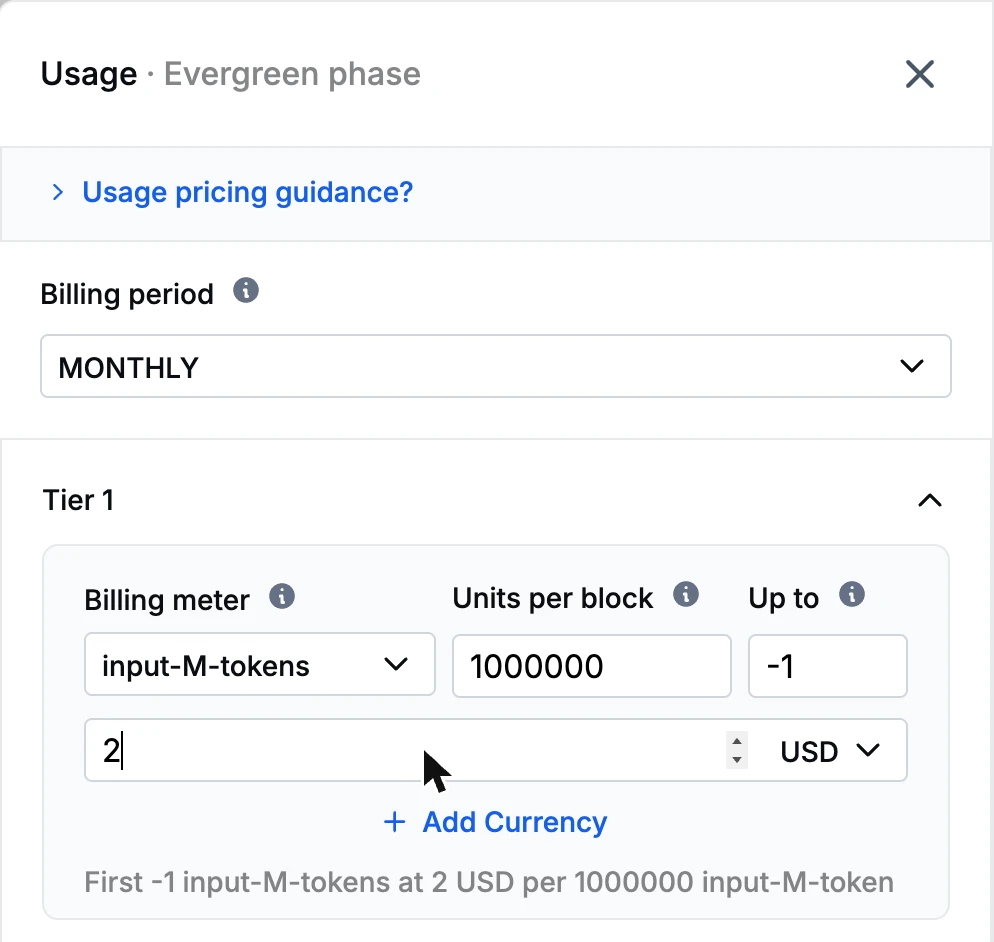 Aviate Metering usage events
POST /plugins/aviate-plugin/v1/metering/billing/{accountId}
[
{
"billingMeterCode": "api_calls",
"subscriptionId": "f3b2a1d4-c5e6-7890-abcd-123456789abc",
"trackingId": "batch-2026-02-14-001",
"timestamp": "2026-02-14T10:00:00Z",
"value": 150
}
]Screenshot from a test environment, with a demo account, AI Demo Co.
Capabilities
Features for AI Billing
Aviate
Meter Every Dimension
Create a billing meter for each thing you charge for: input tokens, output tokens, requests, GPU seconds, or one meter per model.
Usage metering →
Aviate
Send Events Safely
Send events in batches. Each event has a trackingId, so a retry from your gateway or agent does not count twice.
Metering guide →
Aviate
Sell Prepaid Credits
Sell credit packs, grant free credits, and top off below a threshold. Credits pay for usage invoices.
Prepaid credits →
Kill Bill
Platform Fee Plus Usage
Give enterprise buyers a fixed monthly base, with usage on top, on the same invoice.
Usage billing guide →
Kill Bill
Change Prices Often
Model prices move fast. Upload a new catalog version through the API, with no code deploy. It changes the price for new customers, and you choose when existing ones follow.
Catalog and pricing →
Aviate
Watch Billing Health
Aviate Health reports queues, warn and error logs, HTTP responses and database pools, and lists stuck events and parked accounts.
Aviate Health →
How It Works
Set Up AI Billing in Three Steps
1
Define Meters and Prices
Create a billing meter per dimension and a usage plan with its price. Add a recurring plan if you charge a platform fee.
2
Send Usage Events
From your API gateway or inference service, send token counts, requests or GPU seconds to Aviate Metering.
3
Invoice and Collect
Kill Bill invoices usage at the end of each period, uses wallet credits if the customer has a wallet, and collects payment through your gateway.
Why Kill Bill
Why Use Kill Bill for AI Billing
Kill Bill
Open Source Core
Kill Bill is open source under the Apache 2.0 license. Bring your own gateways, analytics and integrations.
Usage Data Stays With You
Deploy on your own infrastructure. Usage, invoices and payments live in your database.
 MySQL
MySQL MariaDB
 PostgreSQLKill Bill
Any Payment Gateway
Collect with Stripe, Adyen, Braintree, Hyperswitch or your own gateway through payment plugins.
Plugins →
In Production Since 2010
Deployments on the platform have invoiced billions of dollars since 2010.
FAQs
AI Billing FAQ
How do I bill customers per token?
Send token counts as usage events to Aviate Metering, with a billing meter for tokens, and price the meter in a usage plan, for example $2 per block of 1,000,000 tokens. Kill Bill totals the tokens for each billing period and invoices them in arrears.
Can I charge different prices for input tokens, output tokens or different models?
Yes. Create one billing meter per dimension, for example input tokens, output tokens, or one meter per model, and give each meter its own price.
Can I sell prepaid AI credits?
Yes, with Aviate Wallet. Customers buy credits, which Kill Bill invoices and collects. The credits pay for usage invoices, and when the balance falls below a threshold you set, the wallet tops off automatically. You can also grant free credits, such as a sign-up bonus.
Can I combine a monthly platform fee with usage?
Yes. The customer has a recurring plan for the platform fee and a usage plan for tokens or requests. With the account billing cycle, both appear on the same invoice: the fee billed in advance, the usage billed in arrears.
What happens if my service sends the same usage event twice?
Each event carries a trackingId. Resubmitting events with the same trackingId is safe, so a retry does not count the usage twice.
Is AI usage billing part of Kill Bill open source?
Kill Bill open source can bill usage that you aggregate and record per subscription through its API. Metering of raw events, Aviate Wallet and Aviate Health are part of Aviate, the enterprise offering of Kill Bill.
How do I bill for LLM API usage?
Count the tokens or requests of each API call in your gateway and send them as usage events to Aviate Metering. Each event names the billing meter and the subscription. Kill Bill invoices the total at the end of the billing period, at the price of the usage plan.
Is there an open source billing system for AI products?
Kill Bill is an open source billing platform under the Apache 2.0 license. It bills subscriptions and usage that you record through its API. For raw event metering and prepaid credits, Aviate, the enterprise offering of Kill Bill, adds Aviate Metering and Aviate Wallet.
How do I set up usage-based billing for AI agents?
Treat each billable action of an agent, such as a run, a tool call or the tokens it uses, as a usage event on a billing meter. Price the meter in a usage plan, and add prepaid credits with Aviate Wallet if customers pay upfront.
Is there a tutorial for AI usage billing?
Yes. The AI usage tutorial in the Kill Bill docs sets up a billing meter for input tokens, a usage plan at $2 per 1,000,000 tokens and a wallet with automatic top-off, step by step through the API.
Ready to Bill Your AI Product?
Follow the AI usage tutorial in the sandbox, or talk to our team about your pricing.