


Platform · Open source and Aviate
Plugins and Integrations
Connect Kill Bill to your payment gateways, tax engines and business systems. Add your own logic with Java plugins, and integrate through the REST API and push notifications, without forking the core.
 Kill Bill open source: plugin framework, REST API, push notifications
 Aviate: plugin marketplace in its UI
Last updated: October 2026
Trusted by companies processing billions in revenue








Short answer
You extend Kill Bill with plugins written in Java, and each plugin runs separately from the core. Ready-made plugins connect payment gateways such as Stripe, Adyen, Braintree and Hyperswitch, and tax engines such as Avalara AvaTax, Vertex and Kintsugi. You can install, start, stop and restart a plugin through the API without restarting Kill Bill. Your applications use the REST API, with client libraries in several languages, and receive events through push notifications. Aviate, the enterprise offering of Kill Bill, adds a plugin marketplace in its UI.
At a Glance
Plugins and Integrations at a Glance
- Plugin framework
- Java plugins, packaged as OSGi bundles, each with its own libraries
- Plugin types
- Payment, payment control, invoice, notification, entitlement, catalog, usage
- Lifecycle
- Install, start, stop, restart and uninstall through the API, without restarting Kill Bill
- Configuration
- Per tenant, through the API or the Kaui admin UI
- REST API
- Official client libraries for Java, PHP, Python, Ruby, Node and Go
- Events
- Push notifications to a callback URL per tenant, and notification plugins inside Kill Bill
- Deployment
- Standalone server with REST APIs, or embedded as a Java library
- Open source or Aviate
- The framework, the API and the plugins maintained by Kill Bill are open source. Aviate adds a plugin marketplace
Ready-Made Plugins
Plugins You Can Install Today
Maintained by Kill Bill unless stated otherwise. Use them as they are, or as a starting point for your own.
Payment


 GoCardless example plugin
Hyperswitch by Hyperswitch
Deposit batch deposits
GoCardless example plugin
Hyperswitch by Hyperswitch
Deposit batch deposits


 Kintsugi
Notifications and data
Email notifications
Analytics
Source: the Aviate plugin marketplace and the plugin list of the Kill Bill docs, October 2026.
Capabilities
How You Extend and Integrate Kill Bill
Custom Plugins
Write a plugin in Java by implementing a plugin API, for example to connect a regional payment processor. Each plugin is isolated and can use its own library versions without conflict.
Plugin guide →
Install Without Restarting
Install, start, stop, restart and uninstall plugins through the plugin management API, while Kill Bill keeps running.
Plugin management →
REST API and Client Libraries
Accounts, subscriptions, invoices, payments and the catalog are available through the REST API, with official libraries for Java, PHP, Python, Ruby, Node and Go.
API reference →
Push Notifications
Register a callback URL per tenant. Kill Bill sends events, such as a new invoice or a payment, to your endpoint, so your ERP, CRM or data warehouse can react. This is how you can connect an ERP or CRM such as NetSuite or Salesforce.
Push notifications →
Per-Tenant Configuration
Each tenant (a separate billing space, for example one per brand or region) can have its own plugin configuration, for example its own gateway credentials or tax settings, uploaded through the tenant API.
Tenant API →
Standalone or Embedded
Run Kill Bill as a standalone server with REST APIs, or embed it as a library and call the Java APIs from your own application.
Features →
How It Works
From Plugin to Production in Three Steps
1
Pick or Build a Plugin
Start from a ready-made plugin, or implement a plugin API in Java for your own gateway or business logic.
2
Install It
Install it with KPM, the Kill Bill package manager, or the plugin management API, or from the Aviate marketplace. Kill Bill keeps running.
3
Configure It per Tenant
Upload the plugin configuration for each tenant through the API or Kaui, the Kill Bill admin UI. Register your push notification endpoint at the same time.
In the Product
The Aviate Marketplace and the API
The same plugins, listed in the Aviate marketplace, and the two API calls that connect Kill Bill to your systems.
Aviate plugin marketplace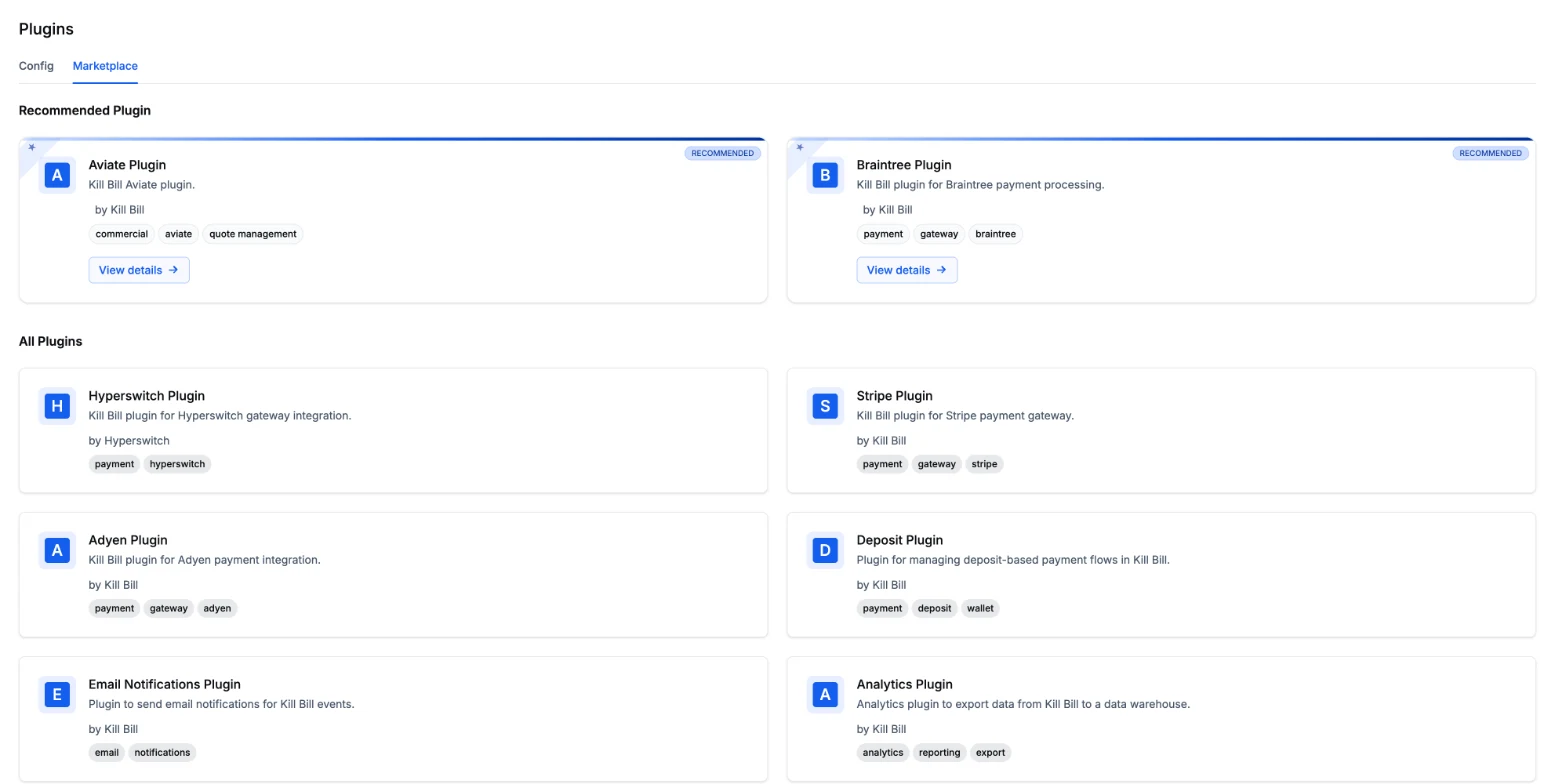 Kill Bill open source tenant API
# Send events for this tenant to your endpoint
POST /1.0/kb/tenants/registerNotificationCallback?cb=https://your-app.example/killbill
# Upload the configuration of a plugin for this tenant
POST /1.0/kb/tenants/uploadPluginConfig/{pluginName}Screenshot from a test environment.
Why Kill Bill
Why Teams Extend Kill Bill With Plugins
Your Code Stays Separate
Custom logic lives in plugins, not in a fork of the core. Each plugin is isolated and uses its own libraries.
One Payment API Across Gateways
Your application talks to the Kill Bill payment API, and the payment plugin talks to the gateway. Collecting card details on the client side still uses the gateway's own tools.
Open Source
Kill Bill and the plugins maintained by Kill Bill are open source under the Apache 2.0 license. The core is backed by thousands of automated tests.
 Java
Java Docker
 Kubernetes
In Production Since 2010
Deployments on the platform have invoiced billions of dollars since 2010.
FAQs
Plugins and Integrations FAQ
What language are Kill Bill plugins written in?
Plugins are written in Java and packaged as OSGi bundles. Each plugin is isolated from the rest of the code and can use its own library versions.
Do I need to restart Kill Bill to install or update a plugin?
No. The plugin management API covers the whole lifecycle: install, start, stop, restart and uninstall, while Kill Bill keeps running.
Which payment gateways and tax engines have a plugin?
Payment plugins exist for Stripe, Adyen and Braintree, plus Hyperswitch, maintained by Hyperswitch. A GoCardless plugin is available as an example. Tax plugins exist for Avalara AvaTax, Vertex and Kintsugi. For another gateway, you can write your own payment plugin.
How do I send Kill Bill events to my other systems?
Register a callback URL for the tenant, and Kill Bill sends push notifications to it when events happen, such as a new invoice or a payment. For logic that must run inside Kill Bill, write a notification plugin that listens to Kill Bill events.
Can I use Kill Bill as an embedded library?
Yes. Kill Bill can run as a standalone server with REST APIs, or be embedded as a library that your Java application calls directly.
What does Aviate add to plugins?
Aviate, the enterprise offering of Kill Bill, lists the available plugins in a marketplace in its UI, where you can also edit plugin settings. The plugin framework and the plugins maintained by Kill Bill are part of Kill Bill open source.
Ready to Build on Kill Bill?
Browse the plugins in the sandbox, or talk to our team about your integrations.