


Platform Capability

Sales Tax and VAT on Your Customer Invoices

Add tax to the invoices you send to customers, using Avalara, Vertex, Kintsugi or Aviate Tax country rates. Format invoices with your own templates and keep a record of every change.

Last updated: October 2026

Trusted by companies processing billions in revenue
Short answer

How does Kill Bill handle sales tax and VAT?
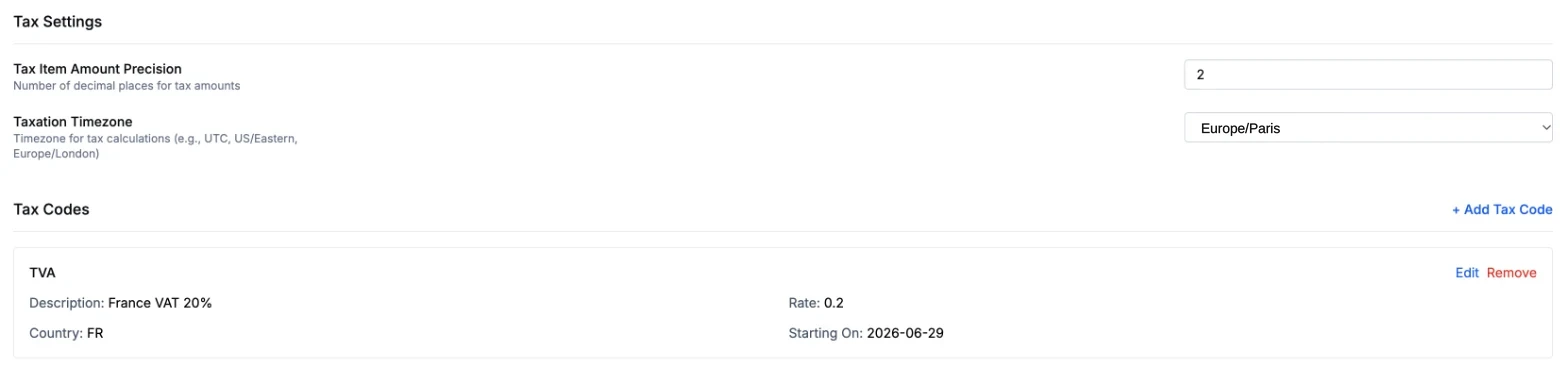
Kill Bill adds tax to customer invoices through a tax engine you choose. Open source plugins connect Avalara AvaTax (US sales tax by state, county and city), Vertex O Series and Kintsugi. Aviate Tax, part of Aviate, applies the VAT or GST rates you set per product and country, without a third-party engine. Tax is computed when the invoice is generated and added as separate tax lines. Kill Bill does not file tax returns.
Aviate Tax settings: a France VAT tax code at 20 percent starting 2026-06-29, with the taxation time zone set to Europe/Paris
A France VAT tax code in Aviate Tax
Overview

How Kill Bill Calculates Tax

Kill Bill computes tax when it generates a customer invoice and adds it as separate tax lines on that invoice. You choose the engine: the open source plugins for Avalara AvaTax, Vertex O Series or Kintsugi, the Aviate Tax module for country-level rates, or your own invoice plugin.

Kill Bill handles tax on the invoices you issue to your customers. It does not process supplier bills or accounts payable.

Billing cycle runs Recurring, usage and one-off charges Builds the invoice items Before tax YOUR TAX ENGINE Your choice AvaTax O Series Kintsugi Aviate Tax In Aviate Tax lines added to the invoice Next to the items they apply to Recorded in the audit log

Which Tax Engines Work with Kill Bill?

Tax engines you can use with Kill Bill, and where each one applies
Option Coverage Exemptions Availability Docs
Avalara AvaTax plugin US sales tax by state, county and city Avalara entity use code on the account Open source plugin Docs
Vertex O Series plugin Vertex O Series coverage Set in Vertex Open source plugin GitHub
Kintsugi plugin Jurisdictions configured in Kintsugi Exempt flag or entity use code on the account Open source plugin Docs
Aviate Tax Country level; states and provinces not yet supported Exempt flag on the customer’s tax registration Included in Aviate Docs
Your own engine Your rules Your rules Invoice plugin API Docs

The Avalara, Vertex and Kintsugi plugins need an account with that provider. Not sure which engine fits? Talk to us.

Capabilities

What You Can Do

Tax, invoice templates, currencies and change records in one billing system.
Automated Tax Calculation
Aviate Tax adds a tax line for each product you map to a tax code. Each code has a rate and validity dates, and applies when its country matches the country on the customer's tax registration in Aviate.
Tax configuration →
Exemptions and Adjustments
Exempt accounts with your engine's exemption codes, or with the exempt flag in Aviate Tax. With AvaTax, Vertex or Kintsugi, an invoice item adjustment reverses the tax on that item.
AvaTax exemptions →
Custom Invoice Templates
Invoices are HTML templates (Mustache) uploaded per tenant through the API, with translation files per locale. No redeploy. A formatter plugin is only needed to change the invoice data itself. Aviate includes invoice and email templates in English, Spanish, French, German, Chinese and Arabic.
Template design →
Multi-Currency Invoicing
Invoice customers in their local currency. Each account's currency is set at creation, and charges, taxes and credits use that currency.
Multi-currency guide →
Audit Trail
Kill Bill records who made each change and when, in audit logs available through the API. Changes after an invoice is generated are added as new items, such as credits and adjustments, so the history stays readable.
Audit & compliance →
Access Controls and Security
Role-based access control with LDAP, Okta or Auth0. Define who can view, create or change invoices, refunds and financial data.
Security controls →
How It Works

From Charge to Taxed Invoice

1
Configure Tax Rules
Choose your engine: connect Avalara, Vertex or Kintsugi, or set up Aviate Tax with your country rates. Map products to tax codes and set exemptions.
2
Generate Invoices
As billing cycles run, Kill Bill calculates charges, applies taxes, and generates invoices with full line-item detail. Your custom template formats the invoice for customer delivery.
3
Audit and Report
Read the audit logs through the API or the admin UI. Charges, tax lines, adjustments and payments are recorded with who made them and when. Invoice and tax data are available through the API.
Kill BillIllustrative example
ItemAmount (EUR)
Pro plan, monthly100.00
VAT FR 20%Tax line for Pro plan20.00
API calls, usage24.00
VAT FR 20%Tax line for API calls4.80
Subtotal excl. VAT124.00
VAT 20%24.80
Total148.80

Illustrative invoice. Tax is added as separate lines next to the items it applies to.

Account / acme-europe / Invoices / Invoice 1042
Invoice 1042View customer invoice htmlTag AsVoid
Invoice date2026-10-01
Target date2026-10-01
DescriptionTypeStart DateEnd DateAmount
Pro plan, monthlyRECURRING2026-10-012026-11-01€100.00Adjust
VAT FR 20%TAX2026-10-012026-11-01€20.00Adjust
API calls, usageUSAGE2026-09-012026-10-01€24.00Adjust
VAT FR 20%TAX2026-09-012026-10-01€4.80Adjust
Invoice Total:€148.80 (EUR)
Refunded:€0.00 (EUR)
Balance:€148.80 (EUR)

Illustration of the invoice view in Kaui, the open source admin UI, with sample data. Tax lines appear as TAX items next to the items they apply to.

Why Kill Bill

Why Teams Choose Kill Bill for Tax

Traceable Billing Records
Each change is logged with who made it and when. Invoices change through credits and adjustments, so the history stays readable.
One Engine for Every Charge
The same tax engine runs on every billing cycle, for recurring, usage and one-off charges. No manual lookups, no spreadsheet errors.
Full Data Ownership
Self-host your billing data to meet data residency and sovereignty requirements. Your financial records live on your infrastructure, under your control.
FAQs

Frequently Asked Questions

Does Kill Bill calculate US sales tax by state?
Yes, through the Avalara AvaTax, Vertex or Kintsugi plugins. The AvaTax plugin returns tax by state, county and city. Aviate Tax works at country level and does not yet support states or provinces.
Can Kill Bill calculate VAT or GST?
Yes. Aviate Tax applies the VAT or GST rates you set for each product and country, based on the item's service end date. It does not decide place of supply or apply reverse charge. You can also use an external tax engine, depending on its coverage.
Which tax engines work with Kill Bill?
Avalara AvaTax, Vertex and Kintsugi, through open source plugins under the Apache 2.0 license. You can also connect another engine by writing an invoice plugin.
Which parts are open source?
Kill Bill and the AvaTax, Vertex and Kintsugi plugins are open source. Aviate Tax is part of Aviate, the commercial offer built on Kill Bill.
Can I see the tax before an invoice is final?
Yes. A dry-run invoice shows the tax lines the engine returns, without saving the invoice in Kill Bill.
Does Kill Bill file tax returns?
No. Kill Bill adds tax lines to your invoices. Filing and remittance are handled by your tax provider or your tax team.
Does Kill Bill process vendor bills?
No. Kill Bill calculates tax on the invoices you send to your customers. Supplier bills and accounts payable belong in your accounting or AP system.
Can I customize the invoice format?
Yes. Invoices use HTML templates (Mustache) that you upload per tenant through the API, with translation files per locale. Changes apply without redeploying. To add or change the data shown on the invoice, you write an invoice formatter plugin.
How are refunds and credits handled?
With AvaTax, Vertex or Kintsugi, an invoice item adjustment reverses the tax on that item. A refund without an item adjustment does not change the tax already invoiced. Each operation is recorded with an audit record.
How does Kill Bill help with GDPR?
You can self-host Kill Bill, limit access by role, and read the audit logs. Compliance stays the responsibility of your organization.
Does Kill Bill support e-invoicing?
Avalara is the Kill Bill partner for tax and e-invoicing, including Factur-X. Talk to us about the countries and formats you need.

See How Kill Bill Handles Tax

Start with the sandbox, or talk to our team about your tax engine and your countries.