


Use Case · Marketplaces and eCommerce
Billing and Payments for Marketplaces and eCommerce
Bill subscriptions and one-off purchases, collect through the gateways you choose, price in each currency, and run several stores or brands on one deployment.
 Kill Bill (open source): payments, gateways, currencies, refunds
 Aviate (enterprise): country tax rates, coupons, prepaid credits
Last updated: October 2026
Trusted by companies processing billions in revenue








Short answer
How do you bill and collect payments for a marketplace or eCommerce platform?
Kill Bill bills subscriptions and one-off charges, and collects through payment plugins for gateways such as Stripe, Adyen, Braintree and Hyperswitch. An account can hold payment methods on several gateways. Each catalog price has a value per currency, and each account is invoiced in its own currency. Refunds, partial refunds and chargebacks are payment transactions, and each store or brand can be its own tenant on one deployment. Kill Bill is open source. Aviate, its enterprise offering, adds country tax rates, coupons and prepaid credits.
Kill Bill and Aviate
Who Does What for Commerce Billing
Aviate runs on top of Kill Bill. With Aviate, you keep everything in the left column and add the right one.
Kill BillOpen source, Apache 2.0. Free, installed and run by you, without support or SLA.
- Payment API and gateway pluginsStripe, Adyen, Braintree, Hyperswitch, or your own
- Several payment methods per accountOn different gateways
- Subscriptions and one-off chargesCatalog plans, and charges through the invoice API
- Multi-currency catalogA value per currency, invoices in the account currency
- Refunds, chargebacks, chargeback reversalsReversals where the payment plugin allows them, plus invoice adjustments and account credit
- Payment retries and dunning, tax plugins, multi-tenancy
AviateThe enterprise offering of Kill Bill. Licensed, with Level 3 support from the engineers.
- Aviate TaxTax rates per country and per product, with start and end dates
- Aviate CouponsPercentage or fixed discounts, limits, eligible plans
- Aviate WalletPaid and free credits, automatic top-off, expiration
- Catalog UICreate products, plans and prices without editing XML
- Aviate Health and the plugin marketplace
Features specific to one edition are tagged Kill Bill or Aviate. Untagged items apply to both.
At a Glance
Commerce Billing at a Glance
- Gateways
- Payment plugins for Stripe, Adyen, Braintree, Hyperswitch, or your own
- Payment methods
- Several per account, on different gateways
- Currencies
- A value per currency for each catalog price. Each account is invoiced in its currency
- Purchases
- Subscriptions from the catalog, one-off charges through the invoice API
- Refunds and disputes
- Full or partial refunds, chargebacks, and chargeback reversals where the payment plugin allows them
- Failed payments
- Configurable payment retries and dunning
- Tax
- AvaTax, Vertex or Kintsugi (US sales tax) plugins. With Aviate, tax rates per country and per product
- Invoices
- Invoice templates and translations per tenant, uploaded through the API
- Audit
- Changes are recorded in audit logs, available through the API
- Stores and brands
- One tenant each, with its own catalog, accounts and plugin configuration
Commerce Models
What You Sell and How to Bill It
Common marketplace and eCommerce cases, and the Kill Bill and Aviate features behind each one.
| Case | Example | How to set it up | Edition |
|---|---|---|---|
| Subscription box or membership | A monthly box at €29 | A recurring plan in the catalog | Kill Bill |
| One-off purchase | An accessory at €15 | A charge created through the invoice API | Kill Bill |
| Seller fees | Sellers pay a monthly platform fee | Each seller is an account with a recurring plan | Kill Bill |
| Prices in several currencies | EUR, USD, GBP | A value per currency for each catalog price. Catalog | Kill Bill |
| Sales tax or VAT from a provider | Tax by address | AvaTax or Vertex tax plugins, or Kintsugi for US sales tax. Tax | Kill Bill |
| VAT by country | 20% VAT in France | Aviate Tax: rates per country and per product, with dates | Aviate |
| Promotions | 20% off a new subscription | Aviate Coupons, applied when the subscription is created | Aviate |
| Store credit | Gift balance or prepaid credit | Account credit in Kill Bill, or Aviate Wallet for paid and expiring credits. Prepaid credits | Kill Bill Aviate |
Example prices are demo values.
Worked Example
An Order With VAT and a Partial Refund
A customer in France buys a monthly box and an accessory, then returns the accessory.
Illustration, not a screenshot
The subscription and the one-off charge each get their own invoice. Both are paid by card through the store's payment plugin.
Store A, customer in FranceAccount currency: EUR
Order totaltwo invoices, demo prices
| Item | Amount |
|---|---|
| Invoice 1: monthly box recurring plan €29.00 + VAT 20% €5.80 | €34.80 |
| Invoice 2: accessory one-off charge €15.00 + VAT 20% €3.00 | €18.00 |
| Total paid | €52.80 |
| Step | What Kill Bill records |
|---|---|
| 1. Order | A subscription to the monthly box, and a one-off charge for the accessory through the invoice API |
| 2. Tax | A VAT item at 20% on each invoice, from Aviate Tax |
| 3. Payment | Two card payments, €34.80 and €18.00, through the payment plugin |
| 4. Return | A refund of €18.00 on the accessory payment, recorded as a REFUND transaction, with an adjustment of the accessory item |
| 5. Net | €34.80 kept for the box and its VAT |
Illustration with demo prices. Refund through the invoice payment API and adjust the item in the same call, so the invoice matches the refund.
In the Product
A VAT Rate in Aviate Tax
The 20% French VAT of the example, set up as a tax code in Aviate.
Aviate tax settings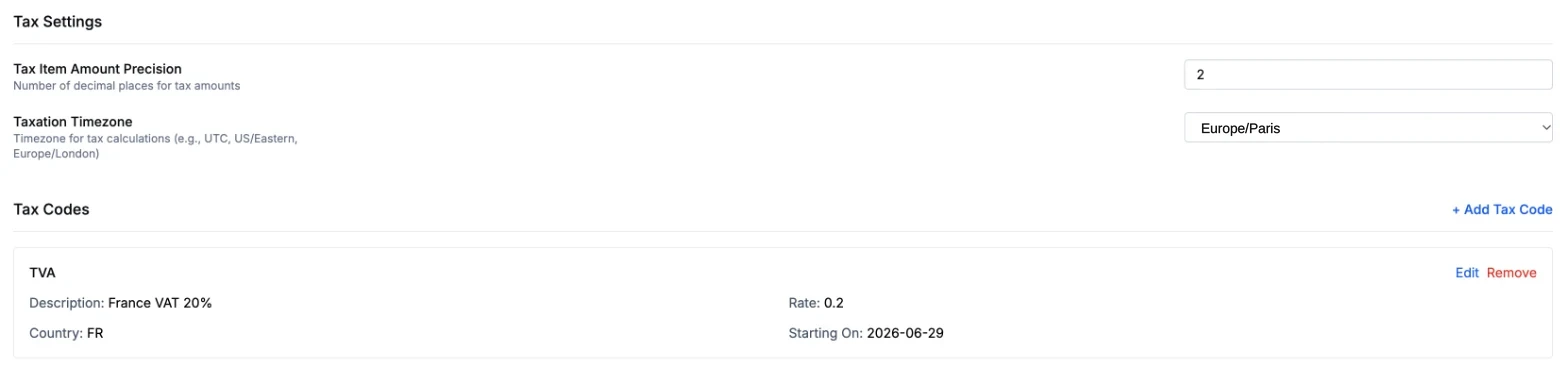
Screenshot from a test environment.
Capabilities
Features for Commerce Billing
Kill Bill
Your Choice of Gateway
Collect through payment plugins for Stripe, Adyen, Braintree, Hyperswitch or your own gateway. An account can hold several payment methods.
Plugins →
Kill Bill
Several Currencies
Each catalog price lists a value per currency. Each account is invoiced in its own currency.
Catalog →
Kill Bill
Subscriptions and One-Off Charges
Bill memberships and boxes from the catalog, and one-off purchases through the invoice API.
Invoice API →
Kill Bill
Refunds and Chargebacks
Full or partial refunds and chargebacks, recorded as payment transactions. Chargeback reversals where the payment plugin allows them.
Payment API →
Aviate
Country Tax Rates and Coupons
Aviate Tax applies the tax rates you set per country and per product. Aviate Coupons add percentage or fixed discounts.
Aviate Tax →
Kill Bill
Several Stores, One Deployment
Each store or brand can be a tenant with its own catalog, accounts and gateway configuration.
Features →
How It Works
Set Up Commerce Billing in Three Steps
1
Set Up Stores and Gateways
Create a tenant per store or brand, install the payment plugins you need, and upload each store's gateway configuration.
2
Define Products, Prices and Tax
Create plans with a price per currency, and set up tax with a tax plugin or, with Aviate, tax codes per country.
3
Bill, Collect and Refund
Kill Bill invoices subscriptions and one-off charges, collects through the gateway, retries failed payments, and records refunds and chargebacks.
Why Kill Bill
Why Use Kill Bill for Commerce Billing
Kill Bill
Open Source Core
Kill Bill is open source under the Apache 2.0 license, free, with no fee per transaction. Payments, invoices and plugins included.
Order and Payment Data Stays With You
Deploy on your own infrastructure. Accounts, invoices and payments live in your database.
 MySQL
MySQL MariaDB
 PostgreSQLKill Bill
Gateway Choice Stays Yours
Your application calls the Kill Bill payment API. Payment plugins talk to the gateways you choose.
Plugins →
In Production Since 2010
Deployments on the platform have invoiced billions of dollars since 2010. Groupon has used Kill Bill for years.
FAQs
Commerce Billing FAQ
Which payment gateways can a marketplace or eCommerce site use with Kill Bill?
Kill Bill collects payments through payment plugins. Plugins exist for Stripe, Adyen and Braintree, and Hyperswitch maintains its own plugin. You can write your own plugin for another gateway. An account can hold several payment methods, on different gateways.
How do I bill customers in several currencies?
Each account has a currency. Each price in the catalog lists a value for every currency the catalog supports, and Kill Bill invoices the account in its currency.
Can I bill one-off purchases as well as subscriptions?
Yes. Subscriptions follow the catalog, and one-off charges are created through the invoice API. Several charges sent together go on a single invoice.
Does Kill Bill handle refunds and chargebacks?
Yes. A payment can be refunded in full or in part, and chargebacks are recorded as payment transactions, as are chargeback reversals where the payment plugin allows them. A refund can adjust the matching invoice items in the same call.
How do I charge sellers a monthly platform fee?
Make each seller an account with a recurring plan in the catalog. Kill Bill invoices the fee every month and collects it through the seller's payment method.
How do I add VAT or sales tax to online store invoices?
With Kill Bill open source, use a tax plugin: Avalara AvaTax, Vertex, or Kintsugi for US sales tax. With Aviate, Aviate Tax applies the tax rates you configure per country and per product, with start and end dates.
Can I run several stores or brands on one deployment?
Yes. Kill Bill is multi-tenant: each store or brand can be a tenant, with its own catalog, accounts, API credentials and plugin configuration.
What happens when a payment fails?
Payment retries can be configured or turned off, and dunning rules define what happens to the account after failed payments.
Is there open source billing software for eCommerce subscriptions?
Kill Bill is an open source billing and payments platform under the Apache 2.0 license. It covers subscriptions, one-off charges, invoices, payments through gateway plugins, refunds and multi-currency. Aviate, the enterprise offering of Kill Bill, adds country tax rates, coupons, prepaid credits and a catalog UI.
Ready to Bill Your Store or Marketplace?
Try the sandbox, or talk to our team about your gateways, currencies and tax.