


Use Case · SaaS and Subscriptions
Subscription Billing for SaaS Companies
Trials, tiered plans, monthly and annual billing, add-ons, upgrades with proration, usage on top, and retries when a card fails. All from one catalog you control.
 Kill Bill (open source): catalog, trials, add-ons, proration, dunning
 Aviate (enterprise): catalog UI, coupons, prepaid credits
Last updated: October 2026
Trusted by companies processing billions in revenue








Short answer
How do you bill SaaS subscriptions with trials, upgrades and add-ons?
With Kill Bill, you describe products, plans and prices in a catalog. A plan can start with a free trial or a discount phase, then bill monthly or annually. Add-on products attach to a base plan, and usage can be billed on top. When a customer upgrades in the middle of a period, Kill Bill credits the unused part of the old plan and charges the new one for the rest of the period. Failed payments are retried on a schedule you set, and dunning rules decide what happens next. Kill Bill is open source. Aviate, its enterprise offering, adds a catalog UI, coupons and prepaid credits.
Kill Bill and Aviate
Who Does What for SaaS Billing
Aviate runs on top of Kill Bill. With Aviate, you keep everything in the left column and add the right one.
Kill BillOpen source, Apache 2.0. Free, installed and run by you, without support or SLA.
- Catalog with phasesTrial, discount, fixed term and evergreen phases on each plan
- Plans, billing periods and add-onsMonthly, annual and other periods, add-ons attached to a base plan
- Plan changes with prorationImmediate or at the end of the term, set by catalog rules
- Usage on top of a planUsage billed in arrears with the subscription
- Catalog versions and price overridesNew prices from a date, custom prices per subscription
- Payment retries, dunning, pause, resume and cancel
AviateThe enterprise offering of Kill Bill. Licensed, with Level 3 support from the engineers.
- Catalog in AviateCreate products, plans, phases and prices without editing XML
- Aviate CouponsPercentage or fixed discounts, with a limit, an expiration date and eligible plans
- Aviate WalletPrepaid and free credits, automatic top-off, expiration
- Aviate TaxTax rates per country and per product
- Level 3 supportThe engineers, on a dedicated Slack channel. First response within 1 business day for a P1
Features specific to one edition are tagged Kill Bill or Aviate. Untagged items apply to both.
At a Glance
SaaS Billing at a Glance
- Catalog
- Products, plans, phases and prices, in XML or, with Aviate, in a UI
- Phases
- TRIAL, DISCOUNT, FIXEDTERM and EVERGREEN
- Products
- BASE plans, ADD_ON products tied to a base, and STANDALONE products. Add-ons that a new base plan no longer allows are cancelled automatically
- Billing day
- Align subscriptions on the account, the bundle or each subscription, so a customer can be billed once a month
- Currencies
- A price per currency on each plan
- Plan changes
- Immediate, with proration, or at the end of the term. Catalog rules set the default, the API can override it
- Preview
- An invoice dry run shows what a plan change will cost before it happens
- Price changes
- Catalog versions with an effective date, and a separate date for existing subscriptions
- Usage
- Usage billed in arrears next to the recurring fee
- Failed payments
- Retries on a schedule you set, then dunning states that can block changes or pause the service
- Promotions
- Discount phases in Kill Bill. Coupons with Aviate
- Payments
- Payment plugins for Stripe, Adyen, Braintree, Hyperswitch, or your own
- Reporting
- The analytics plugin keeps a reporting database, with reports in Kaui
Pricing Models
SaaS Pricing Models and How to Set Them Up
Common SaaS pricing models, and the Kill Bill and Aviate features behind each one.
| Model | Example | How to set it up | Edition |
|---|---|---|---|
| Free trial | 14 days free, then $49 per month | A TRIAL phase before the EVERGREEN phase of the plan | Kill Bill |
| Introductory price | Half price for the first 3 months | A DISCOUNT phase with its own price and duration | Kill Bill |
| Tiered plans | Starter, Growth, Scale | One plan per tier, with change rules between them. Catalog | Kill Bill |
| Monthly or annual | Scale billed annually | A plan per billing period, billed in advance by default | Kill Bill |
| Add-ons | Extra storage for Growth customers | An ADD_ON product, available or included with chosen base plans | Kill Bill |
| Usage on top | API calls beyond the plan | A usage section in the plan, billed in arrears. Usage guide | Kill Bill |
| Price increase | New price for new customers first | A catalog version with an effective date, and a later date for existing subscriptions | Kill Bill |
| Custom deal | A discount for one large customer | Price overrides on that subscription | Kill Bill |
| Coupons | WELCOME20 for 20% off | Aviate Coupons: percentage or fixed, limits, expiration, eligible plans | Aviate |
| Prepaid credits | Credits bought upfront | Aviate Wallet with paid and free credits. Prepaid credits | Aviate |
Example prices are demo values.
Worked Example
An Upgrade in the Middle of the Month
A customer on Starter at $49 per month moves to Growth at $199 per month, 4 days into the period.
Illustration, not a screenshot
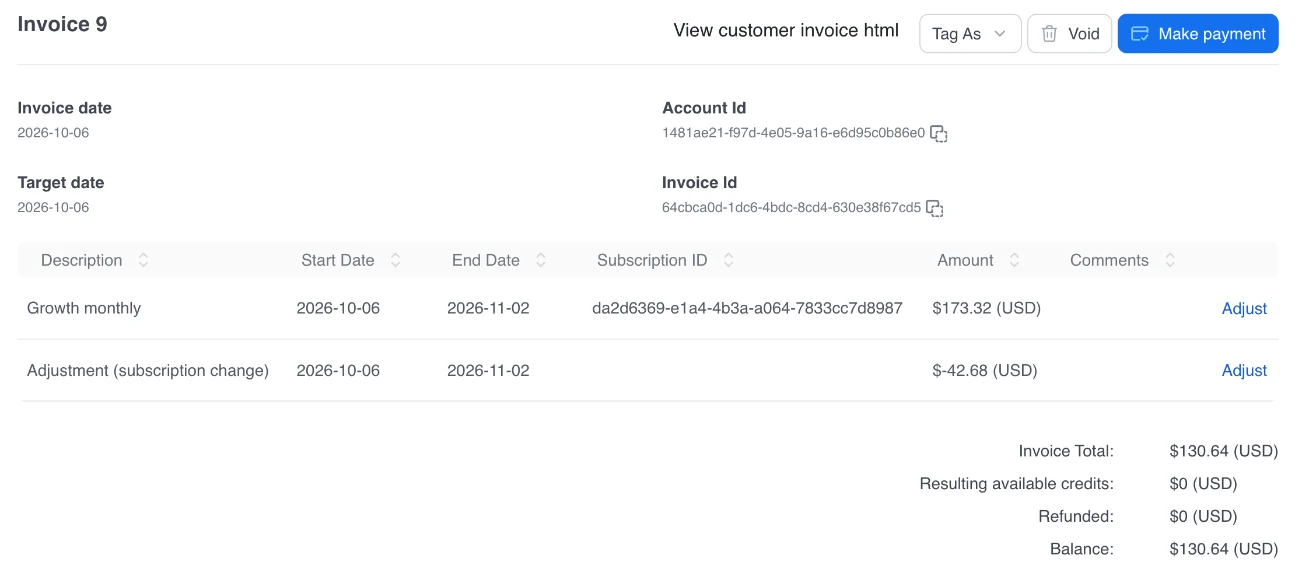
The same figures appear in the Kaui invoice below. From 2 November, the customer is billed $199.00 per month.
Upgrade on 6 OctoberPeriod: 2 October to 2 November, 31 days
InvoiceUSD, demo prices
| Item | Amount |
|---|---|
| Growth monthly, 6 Oct to 2 Nov $199.00 × 27 / 31 days | $173.32 |
| Adjustment (subscription change) unused Starter: $49.00 × 27 / 31 days | −$42.68 |
| Invoice total | $130.64 |
| Step | What Kill Bill does |
|---|---|
| 1. Preview | Returns the invoice the change would create, with an invoice dry run, so the customer sees $130.64 before confirming |
| 2. Change | Moves the subscription to Growth on 6 October, with an immediate change policy |
| 3. Credit | Credits the 27 unused days of Starter: $42.68 |
| 4. Charge | Charges Growth for the same 27 days: $173.32 |
| 5. Invoice | Puts both on one invoice of $130.64, collected through the payment plugin |
With an end-of-term policy instead, the customer stays on Starter until 2 November and moves to Growth then, with no proration. Catalog rules set the default policy for each change, and an API call can override it.
In the Product
The Catalog, the Upgrade Invoice and the Reports
The Starter plan with its 14-day trial in Aviate, the upgrade invoice from the example in Kaui, and a new subscriptions report from the analytics plugin.
Aviate catalog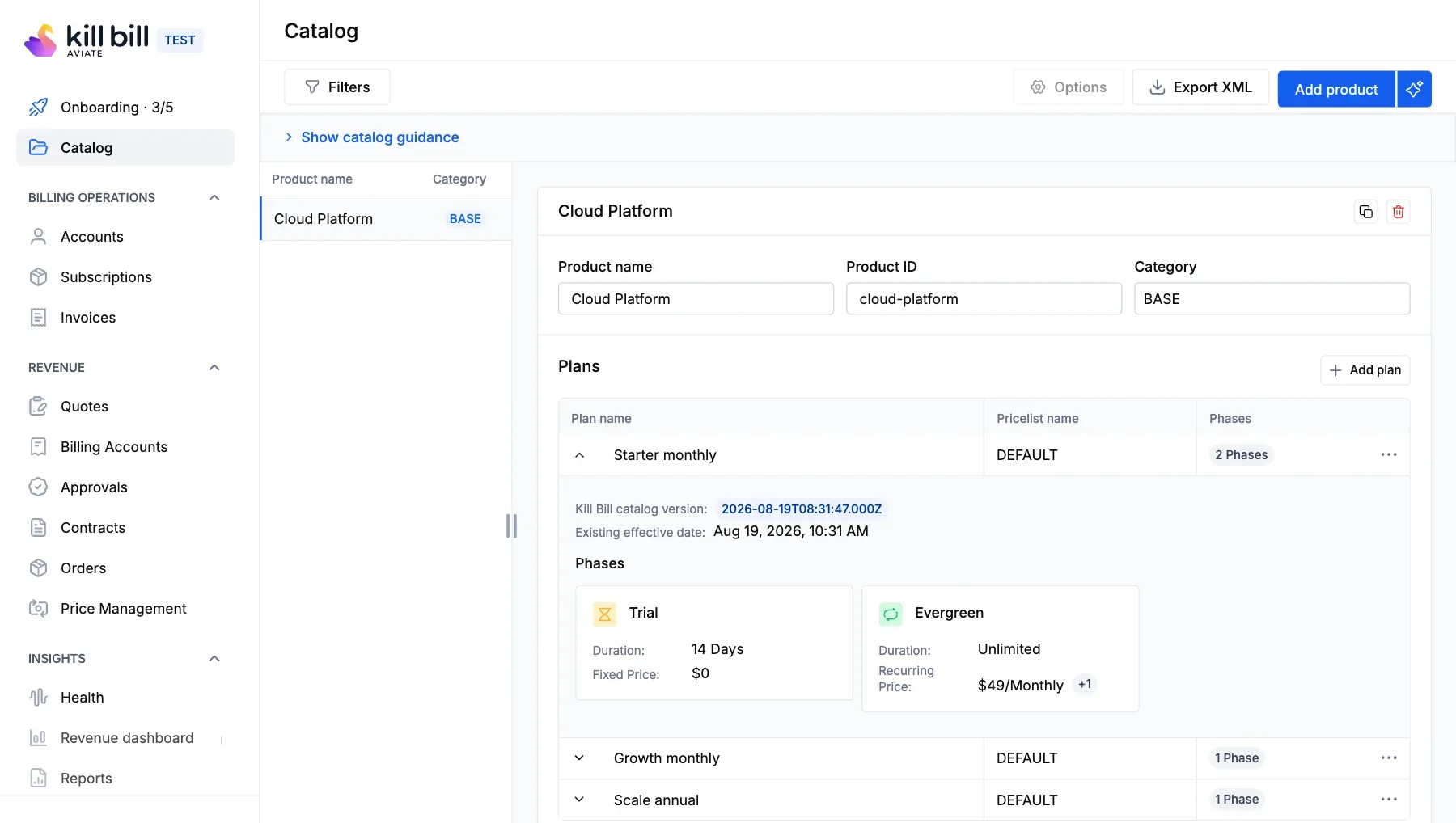 Kaui invoice
 Kaui analytics plugin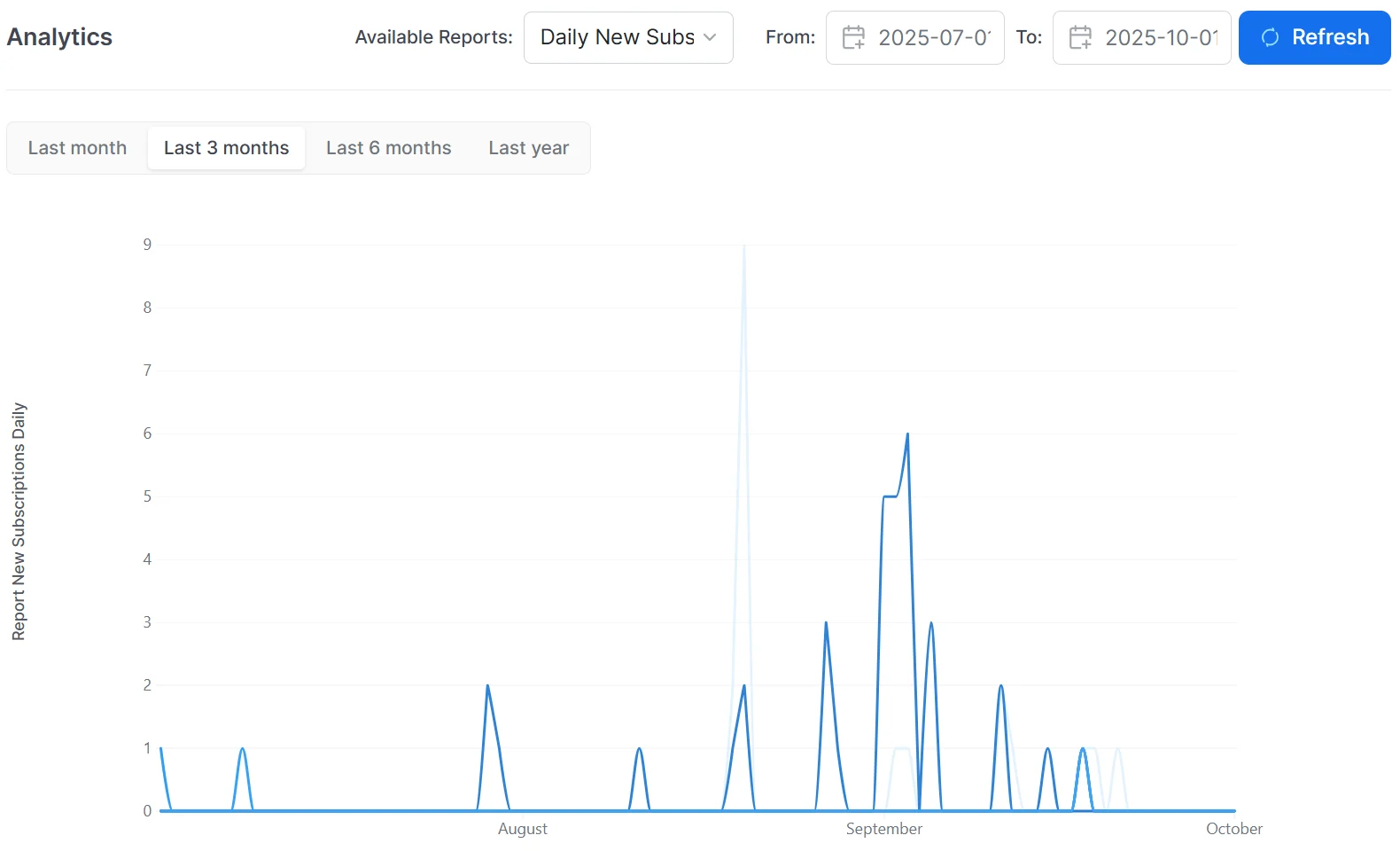
Screenshots from a test environment.
Capabilities
Features for SaaS Billing
Kill Bill
Catalog With Phases
Build each plan from phases: trial, discount, fixed term and evergreen. Plans bill monthly, annually or on other periods.
Catalog →
Kill Bill
Upgrades and Proration
Change plans at once, with a credit for the unused part, or at the end of the term. Preview the invoice with a dry run.
Subscription guide →
Kill Bill
Catalog Versions
Upload a new version with an effective date. Choose when existing subscriptions move to the new prices.
Catalog versions →
Kill Bill
Retries and Dunning
Retry failed payments on your schedule, then block changes or pause the service until the balance is paid.
Dunning guide →
Aviate
Aviate Coupons
Percentage or fixed discounts, with a usage limit, an expiration date and eligible plans.
Coupons →
Aviate
Catalog in Aviate
Create products, plans, phases and prices in a UI, without editing XML.
Catalog →
How It Works
Set Up SaaS Billing in Three Steps
1
Define the Catalog
Create products, plans, phases and prices, with the change and cancellation rules. Upload the catalog, or build it in Aviate.
2
Connect Sign-Up and Payments
Your app creates accounts and subscriptions through the API. Install the payment plugin for your gateway and set retries and dunning.
3
Change Prices Over Time
Upload a new catalog version with an effective date. New customers get the new prices, and you choose when existing ones move.
Why Kill Bill
Why Use Kill Bill for SaaS Billing
Kill Bill
Open Source Core
Kill Bill is open source under the Apache 2.0 license. No fee per transaction, and no share of your revenue.
Subscription Data Stays With You
Deploy on your own infrastructure. Accounts, subscriptions, invoices and payments live in your database.
 MySQL
MySQL MariaDB
 PostgreSQLKill Bill
Your Choice of Gateway
Collect through payment plugins, and keep the gateway you have or add another one.
 Stripe
 Braintree
In Production Since 2010
Deployments on the platform have invoiced billions of dollars since 2010.
Proven in Production
Companies That Run on Kill Bill
Kill Bill powers subscription billing for businesses across industries.
CARFAX
Reduced monthly batch processing from 12 hours to under 1 hour. Integrated Kill Bill with NetSuite and Salesforce for end-to-end quote-to-cash automation.
SaaS Community Platform
Migrated from a SaaS billing provider to Kill Bill for more flexibility to test pricing structures and generate custom analytical reports.
Faceter
Cloud video surveillance provider using Kill Bill for subscription billing at scale with flexible plan configuration.
FAQs
SaaS Billing FAQ
Can Kill Bill handle free trials, tiered plans and add-ons?
Yes. Each plan in the Kill Bill catalog is made of phases, such as a free trial, a discount phase and an evergreen phase. Plans can bill monthly, annually or on other periods. Add-on products attach to a base plan, and the catalog says which add-ons each base plan allows.
How does proration work when a customer upgrades in the middle of a period?
With an immediate change, Kill Bill credits the unused part of the old plan and charges the new plan for the rest of the period, on the same invoice. With an end-of-term change, the new plan starts at the next period and nothing is prorated. Catalog rules set the default policy for each change, and an API call can override it.
Can I show a customer what an upgrade will cost before it happens?
Yes. An invoice dry run returns the invoice that a plan change would create, without changing the subscription. Your app can show that amount before the customer confirms.
Can I change prices without affecting existing customers?
Yes. Upload a new catalog version with an effective date. New subscriptions use the new prices from that date, and existing subscriptions keep their current prices. To move existing subscriptions as well, set effectiveDateForExistingSubscriptions on the plan, and the new price applies to them from that date.
Can I give one customer a custom price?
Yes. When you create a subscription or change its plan, you can override the prices of its plan phases for that subscription only.
Does Kill Bill support coupons and promo codes?
Kill Bill open source handles promotions as catalog phases, for example a discount phase for the first months. Aviate Coupons adds coupon codes with a percentage or fixed discount, a usage limit, an expiration date and a list of eligible plans, applied when the subscription is created.
What happens when a card payment fails?
Kill Bill retries the payment on a schedule you set per tenant. Dunning rules then move the account through states based on how long an invoice stays unpaid, with actions such as blocking plan changes or pausing the service and billing until the balance is paid.
Can customers pause or cancel a subscription?
Yes. The API pauses and resumes a subscription bundle, meaning the base plan and its add-ons, and cancels subscriptions. A cancellation can take effect at once or at the end of the term. Catalog rules set the default policy, which an API call can override.
Can I migrate from another billing system to Kill Bill?
Yes. The Kill Bill migration guide describes how to move active accounts and subscriptions with cutover dates, so customers are billed once, while past invoices and payments stay available from the old system.
Is there open source subscription billing software for SaaS?
Kill Bill is an open source subscription billing and payments platform under the Apache 2.0 license. It covers catalogs with trials and phases, add-ons, plan changes with proration, usage, invoices, payments through gateway plugins, retries and dunning. Aviate, the enterprise offering of Kill Bill, adds a catalog UI, coupons, prepaid credits, country tax rates and Level 3 support.
Ready to Bill Your SaaS Subscriptions?
Try the sandbox, or talk to our team about your plans, trials and pricing changes.