


Use Case · Fintech and Enterprise
Billing You Run on Your Own Infrastructure
For fintechs, banks and large companies that need control: billing data in your database, access by role, a record of who changed what, and plugins for your gateways and systems.
 Kill Bill (open source): self-hosted, roles, audit logs, draft invoices, plugins
 Aviate (enterprise): invoice sequencing, Aviate Health, Level 3 support
Last updated: October 2026
Trusted by companies processing billions in revenue








Short answer
What billing platform can a fintech or enterprise run on its own infrastructure?
Kill Bill is an open source billing and payments platform that you deploy yourself, in your cloud account or data center, with your own MySQL, MariaDB or PostgreSQL database. Users get roles and permissions, from the Kill Bill database or from LDAP, Okta or Auth0. Every change is recorded in audit logs with who made it, when, and why. Invoices can stay in draft until someone commits them, and payment plugins connect to your gateways. Aviate, the enterprise offering of Kill Bill, adds invoice numbering per account or per tenant, Aviate Health for operations, and Level 3 support from the engineers who build the platform.
Kill Bill and Aviate
Who Does What for Enterprise Billing
Aviate runs on top of Kill Bill. With Aviate, you keep everything in the left column and add the right one.
Kill BillOpen source, Apache 2.0. Free, installed and run by you, without support or SLA.
- Self-hosted deploymentDocker images, Tomcat or Kubernetes
- Users, roles and permissionsKill Bill database, LDAP or Active Directory, Okta, Auth0
- Audit logs and historyWho, when, reason and comment for each change, through the API
- Draft invoicesAutomatic invoices stay in draft, and are not paid, until committed
- Push notifications with retriesPer tenant, to your own endpoint
- Multi-tenancy, payment and tax plugins, analytics plugin, Kaui admin UI
AviateThe enterprise offering of Kill Bill. Licensed, with Level 3 support from the engineers.
- Custom invoice sequencingA number sequence per account or per tenant
- Aviate HealthNode metrics, stuck bus and notification entries, diagnostic reports
- One place for operationsManage one or more Kill Bill deployments from Aviate
- Invoice and email templatesEnglish, Spanish, French, German, Chinese and ArabicENESFRDEZHAR
- Level 3 supportThe engineers, on a dedicated Slack channel. First response within 1 business day for a P1
- In Insider Preview: Aviate RBAC roles, approvals and contracts
Features specific to one edition are tagged Kill Bill or Aviate. Untagged items apply to both.
At a Glance
Enterprise Billing at a Glance
- Deployment
- Your cloud account or data center. Docker images, Tomcat or Kubernetes. Premium AWS Marketplace images are also available
- Database
- MySQL, MariaDB or PostgreSQL, run by you
- Scale
- Stateless nodes behind a load balancer. Add nodes as the load grows
- Sign-in
- Users in the Kill Bill database, or from LDAP or Active Directory, Okta or Auth0. Users and roles apply to every tenant they can reach
- Permissions
- Roles made of permissions such as account:create or payment:refund
- Audit
- Audit logs with who, when, reason, comment and previous values, through the API
- Invoice review
- Draft invoices that are not paid until committed
- Invoicing safety
- An account is parked, and invoicing stops for it, when a safety bound is exceeded or the data looks wrong
- Invoice numbers
- One sequence for the deployment. With Aviate, a sequence per account or per tenant
- Card data
- Tokenized by the gateway. Kill Bill keeps the token
- Templates
- Invoice templates and translations per tenant. With Aviate, invoice and email templates in English, Spanish, French, German, Chinese and Arabic
- Integration
- REST API, push notifications per tenant with retries, plugins
- Entities
- One tenant per entity or business unit, with its own catalog, configuration and API credentials
- Support
- Kill Bill: none. Aviate: Level 3 support from the engineers
Requirements
What Your Risk and Finance Teams Ask, and How to Meet It
Common requirements in fintech and large companies, and the Kill Bill and Aviate features behind each one.
| Requirement | Example | How to set it up | Edition |
|---|---|---|---|
| Data residency | Billing data stays in the EU | Deploy in the region of your choice. Accounts, invoices and payments live in your database | Kill Bill |
| Least privilege | Support can update accounts but not refund | Roles with permissions such as payment:refund. User management | Kill Bill |
| Corporate sign-in | Staff sign in with company accounts | LDAP or Active Directory and Okta, with groups mapped to permissions, or Auth0 with permissions set per user | Kill Bill |
| Audit trail | Who refunded this payment, and why | Audit logs with who, when, reason and comment, and history through the API | Kill Bill |
| Review before charging | Finance checks invoices before payment | The AUTO_INVOICING_DRAFT tag keeps automatic invoices in draft until committed | Kill Bill |
| Card data | Keep card numbers out of the billing system | Gateway tokenization through the payment plugins. Security | Kill Bill |
| Feed the ledger | Post invoices and payments to the general ledger | Push notifications per tenant with retries, then the REST API | Kill Bill |
| Several entities | One entity per country | One tenant each, with its own catalog, configuration and API credentials | Kill Bill |
| Invoice numbers per entity | A sequence per tenant | Aviate custom invoice sequencing, per tenant or per account | Aviate |
| Operations | Find and fix stuck events | Aviate Health: node metrics, stuck bus and notification entries, diagnostic reports | Aviate |
Worked Example
A Refund Only Finance Can Make
Support can create and update accounts, but not refund. Finance can refund, and the audit log shows who did it and why.
Kill Bill API roles, refund, audit log# 1. Two roles
POST /1.0/kb/security/roles
{ "role": "customer_support",
"permissions": ["account:create", "account:update",
"invoice:credit", "invoice:item_adjust"] }
POST /1.0/kb/security/roles
{ "role": "finance",
"permissions": ["payment:refund", "invoice:item_adjust"] }
# 2. Jane, in finance, refunds a payment
POST /1.0/kb/invoicePayments/{paymentId}/refunds
X-Killbill-CreatedBy: jane
X-Killbill-Reason: DUPLICATE_CHARGE
X-Killbill-Comment: Charged twice on 14 Feb
{ "amount": 49.00 }
# 3. The audit log of the refund
GET /1.0/kb/paymentTransactions/{transactionId}/auditLogsWithHistory
[ { "changeType": "INSERT",
"objectType": "TRANSACTION",
"changedBy": "jane",
"changeDate": "2026-02-14T10:12:03.000Z",
"reasonCode": "DUPLICATE_CHARGE",
"comments": "Charged twice on 14 Feb",
... } ]| Step | What Kill Bill does |
|---|---|
| 1. Roles | Stores two roles: customer_support without payment:refund, and finance with it |
| 2. Support | Refuses the refund call from a support user, who lacks payment:refund |
| 3. Finance | Accepts the refund from Jane, signed in with the finance role, and records a REFUND transaction |
| 4. Audit | Writes the audit entry with the change itself: changed by jane, the date, the reason and the comment |
| 5. Review | Returns the entry, with history, to an auditor through the API |
The changedBy value comes from the X-Killbill-CreatedBy header. Set it to the signed-in user in your application, and require a reason for refunds and adjustments.
In the Product
Kaui and Aviate
Kaui is the open source admin UI of Kill Bill. Aviate adds its own interface for operations and configuration.
Kaui invoice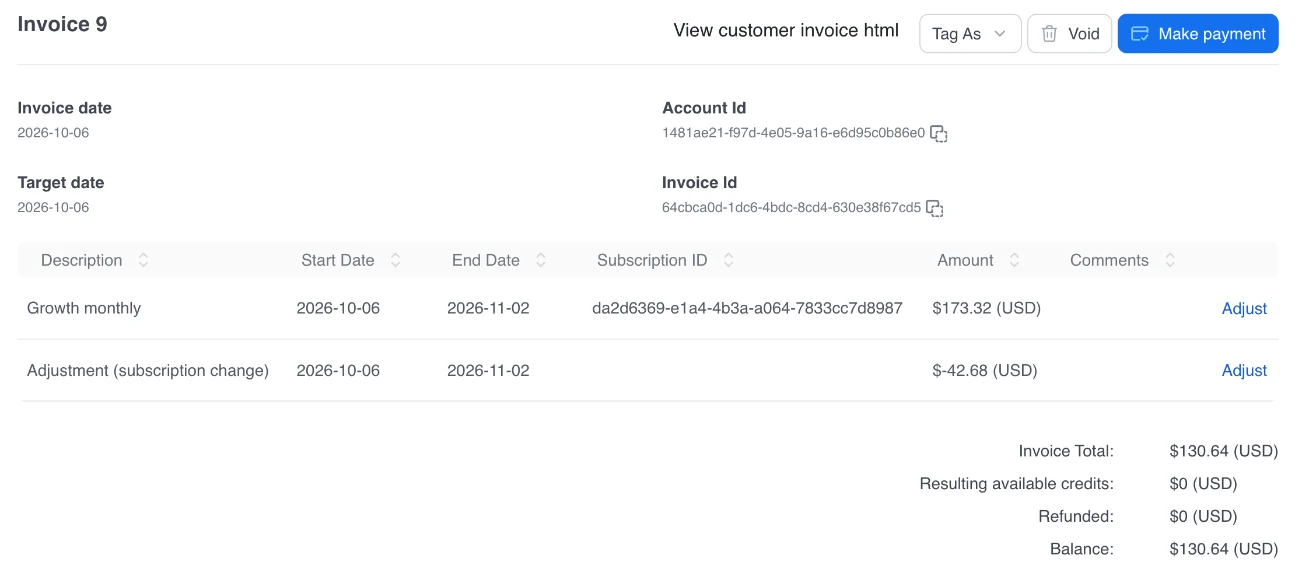 Aviate plugins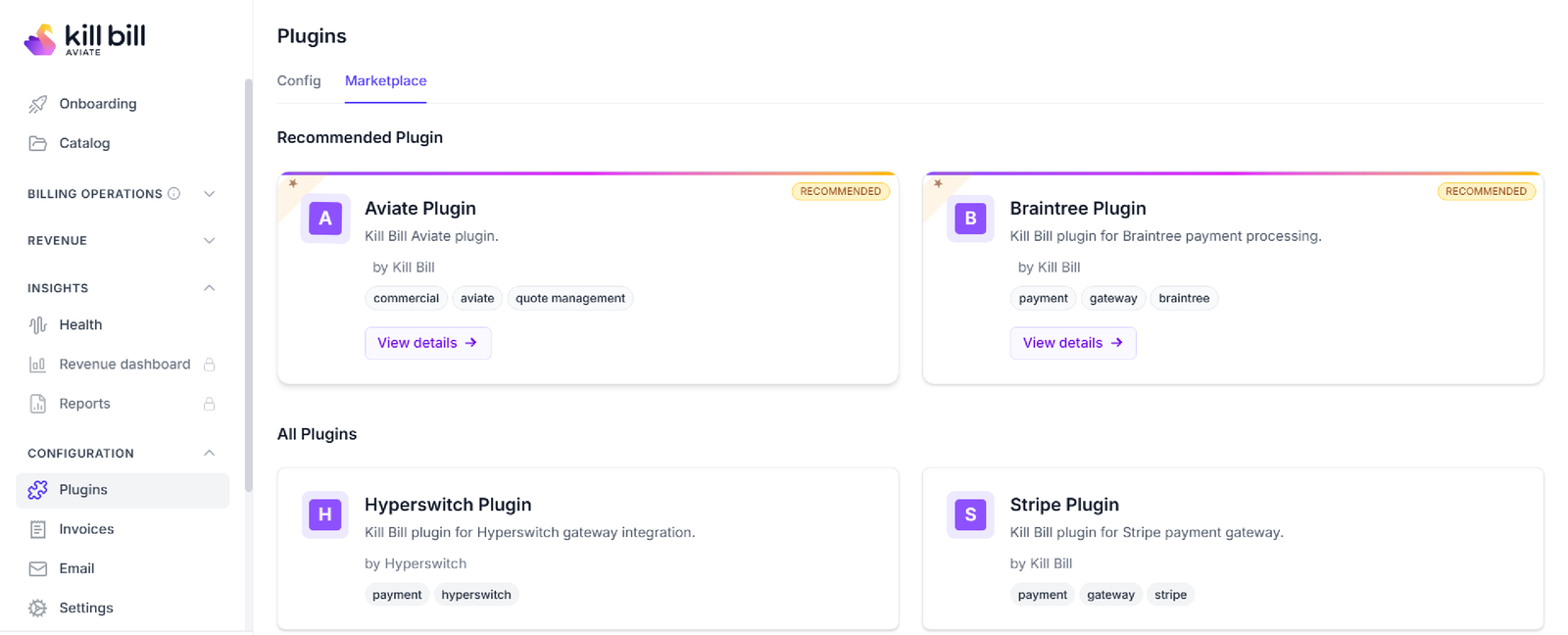
Screenshots from a test environment.
Capabilities
Features for Enterprise Billing
Kill Bill
Self-Hosted
Run Kill Bill in your cloud account or data center, with your own database. Stateless nodes scale out behind a load balancer.
 Docker
 Kubernetes
 TomcatKill Bill
Roles and Permissions
Give each team only the actions it needs. Users come from the Kill Bill database, LDAP, Okta or Auth0.
 Okta
Okta Auth0Kill Bill
Audit Logs and History
Each change records who, when, a reason and a comment. Read it, with previous values, through the API.
API reference →
Kill Bill
Draft Invoices
Keep invoices in draft for review. The payment system ignores them until they are committed.
Subscription guide →
Aviate
Custom Invoice Sequencing
Number invoices per tenant or per account, from a starting number you choose.
Invoice sequencing →
Aviate
Aviate Health
See metrics for every node, find and fix stuck bus and notification entries, and generate diagnostic reports.
Aviate Health →
How It Works
Set Up Enterprise Billing in Three Steps
1
Deploy in Your Environment
Run Kill Bill nodes from the Docker images, on Kubernetes or in Tomcat, behind a load balancer, with your own database.
2
Connect Identity and Systems
Plug in LDAP, Okta or Auth0, define roles, install payment and tax plugins, and register a notification endpoint per tenant.
3
Operate and Audit
Review draft invoices, read audit logs through the API, and, with Aviate, watch the nodes in Aviate Health.
Why Kill Bill
Why Use Kill Bill for Enterprise Billing
Kill Bill
Open Source Core
Kill Bill is open source under the Apache 2.0 license. Your team can read the code that bills your customers.
Billing Data Stays With You
Deploy on your own infrastructure. Accounts, invoices, payments and audit logs live in your database.
 MySQL
MySQL MariaDB
 PostgreSQLAviate
Support From the Engineers
Aviate includes Level 3 support from the engineers who build the platform, on a dedicated Slack channel.
Pricing →
In Production Since 2010
Deployments on the platform have invoiced billions of dollars since 2010.
FAQs
Enterprise Billing FAQ
Can we run Kill Bill on our own infrastructure?
Yes. Kill Bill is self-hosted. Run it from the official Docker images, in Tomcat or on Kubernetes, in your cloud account or data center. Premium AWS Marketplace images are also available. It stores its data in your MySQL, MariaDB or PostgreSQL database, and the nodes are stateless, so you add nodes behind a load balancer as the load grows.
How do roles and permissions work in Kill Bill?
Kill Bill uses Apache Shiro. You create roles made of permissions, such as account:create, invoice:item_adjust or payment:refund, and give roles to users. A call that needs a permission the user does not have is refused. Kaui, the open source admin UI, uses the same users, roles and permissions.
Can Kill Bill use our corporate directory?
Yes. Users can come from the Kill Bill database, from LDAP or Active Directory, or from Okta or Auth0. With LDAP and Okta, you can map your groups to Kill Bill permissions. Users and roles are the same in every tenant, and a user reaches a tenant with its API key and secret.
What does the Kill Bill audit log record?
For each change, the audit log records the change type, the date, the object, who made the change, a reason code, a comment and a request token. Who made the change comes from the X-Killbill-CreatedBy header, and the reason and comment from optional headers. Audit information is stored in the same transaction as the change. You read it through the API, with the previous values when you ask for history.
Does Kill Bill store card numbers?
Payment plugins let the gateway tokenize the card, through client-side tokenization or a hosted payment page, and Kill Bill keeps the token. Server-side tokenization is also possible, but then the systems that receive card data become part of your PCI DSS scope.
Can finance review invoices before customers are charged?
Yes. Tag an account with AUTO_INVOICING_DRAFT, and the invoices Kill Bill generates automatically for it stay in DRAFT. The payment system ignores an invoice until it is committed, so finance can check it first. Invoices you create through the API are not affected. Commit every draft, or those periods are not billed.
Can each legal entity have its own invoice numbers?
In Kill Bill open source, invoice numbers follow one sequence for the deployment. Aviate custom invoice sequencing gives each tenant, or each account, its own sequence with a starting number you choose. Run each entity as a tenant to give it its own sequence, catalog and configuration.
How do we connect billing to our ledger, ERP or data warehouse?
Register a notification endpoint per tenant. Kill Bill sends events such as invoice creation and payment success or failure, and retries on a schedule you set when your endpoint does not answer. Your systems then read the details through the REST API. The analytics plugin also keeps a separate reporting database up to date.
What support is available?
Kill Bill open source comes without support or SLA. Aviate includes Level 3 support from the engineers who build and maintain the platform, on a dedicated Slack channel, with a first response within 1 business day for a P1 issue.
Is there open source billing software for fintech and enterprise?
Kill Bill is an open source billing and payments platform under the Apache 2.0 license. You run it on your own infrastructure, with roles and permissions, audit logs, draft invoices, multi-tenancy and plugins for gateways and tax. Aviate, the enterprise offering of Kill Bill, adds custom invoice sequencing, Aviate Health, invoice and email templates in six languages, and Level 3 support.
Ready to Run Billing on Your Infrastructure?
Try the sandbox, or talk to our team about deployment, access control and audit.